Windows XP Windows 7 Windows 2003 Windows Vista Windows 綜合教學 Linux 系統教學
Windows 10 Windows 8 Windows 2008 Windows NT Windows Server 電腦軟體教學
您现在的位置: Windows教程網 >> Windows教程 >  >> Windows 綜合教學 >> 關於 Windows

Windows 7 開機錯誤 0x000006d18 兩種解法:手動指令與批次檔重設 Windows Update 元件

編輯:關於 Windows

開機彈出 0x000006d18 錯誤雖不影響使用但礙眼,實為 Windows Update 元件異常,重設即可解決。

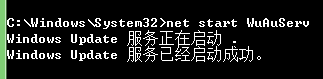
方法一:手動指令 (管理員 CMD)

  1. 以管理員身分開啟命令提示字元。
  2. 依序執行:
  3. net stop WuAuServ
    cd /d %windir%
    ren SoftwareDistribution SoftwareDistribution1
    net start WuAuServ

    

方法二:批次檔自動化

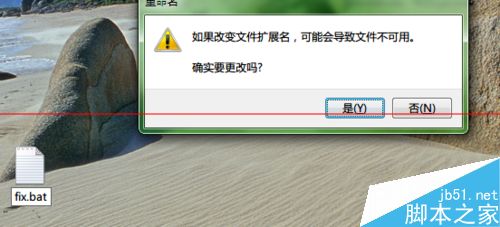
  1. 桌面新建 fix.txt 改副檔名為 fix.bat。
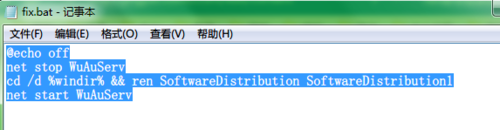
  2. 用記事本開啟貼上以下內容存檔:
  3. @echo off
    net stop WuAuServ
    cd /d %windir% && ren SoftwareDistribution SoftwareDistribution1
    net start WuAuServ

    

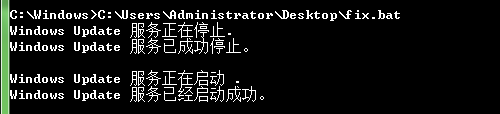
  4. 將 fix.bat 拖入管理員 CMD 執行。

兩種方法皆重設 Windows Update 元件 (重命名 SoftwareDistribution 資料夾),徹底解決 0x000006d18 錯誤。

Copyright © Windows教程網 All Rights Reserved