Win 10 Build 10525 導致 Chrome 64 位元版啟動失敗,顯示「Aw, Snap!」錯誤。暫時解決方案:修改 Chrome 捷徑目標,加入 --no-sandbox 參數停用沙盒機制。
--no-sandbox。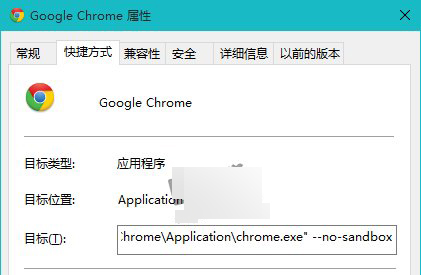
若不願承擔風險,建議暫時改用 Chrome 32 位元版。
Windows說明與支援無法開啟?從正常電腦複製C:\Windows\help資料夾修復
Win8.1 如何將檔案隱藏在圖片中?CMD copy /b 指令實現隱寫術
Win10 無法存取區域網路?防火牆封鎖 80 端口是主因,新增入站規則即可解決
Windows 下 Apache 部署站點公網存取檔案載入不完整?修改 server.xml 協定解決
Win10 Build 10576 新功能詳解:Edge 多媒體串流投射 (Miracast/DLNA)、PDF 整合小娜、Xbox Beta 更新
Win10 系統誤刪 sam 檔案如何恢復?微 PE 開機還原 RegBack 備份教學