Win10 安裝 Office 2016 遇錯誤 30088-1028(0) 提示需更新用戶端。解決步驟:
Troubleshoot.zip 解壓,以管理員身分執行 Uninstall.bat,自動清理殘留元件(過程出現兩個 DOS 視窗,完成自動關閉)。Setup.x64.zh-cn_ProfessionalRetail...)。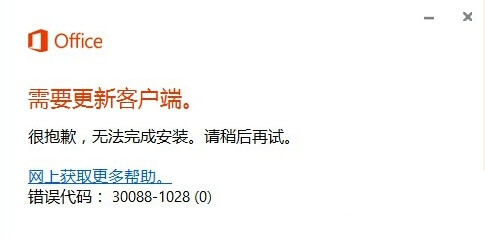
官方修復工具能徹底移除舊版殘留,解決安裝衝突,恢復乾淨環境再安裝新版。
Windows 10 Build 9918/9916/9901/9915 預覽版下載資訊彙整:官方 ISO 與內部版本對照
Win10 免費升級 7/29 截止,之後授權 770 元起:免費期倒數與付費版本價格說明
Windows Server 2012 R2 關閉 IE 增強安全性設定教學
Windows 7 IPv6 支援現狀分析:隨機介面識別碼、NDP、SEND 安全性缺口與修正指令
Windows 10 鎖定螢幕兩大快速方法:保護隱私必學技巧
Windows 10 安裝輸入法教學:以搜狗輸入法為例,下載安裝切換設定全流程
微軟釋出 Win10 SDK Preview 10158:內建 Mobile 模擬器、新增感知/進階拍照/照片匯入 API