Windows XP Windows 7 Windows 2003 Windows Vista Windows 綜合教學 Linux 系統教學
Windows 10 Windows 8 Windows 2008 Windows NT Windows Server 電腦軟體教學
您现在的位置: Windows教程網 >> Windows教程 >  >> Windows 綜合教學 >> 關於 Windows

Win7 如何修改 Office 2013 登入方式?登錄限制僅允許組織帳號/Microsoft 帳號/完全禁用

編輯:關於 Windows

企業環境需管控 Office 2013 登入方式 (僅允許組織帳號、僅允許 Microsoft 帳號、或完全禁止雲端登入)。透過登錄 SignInOptions 即可集中管控。

設定路徑與數值

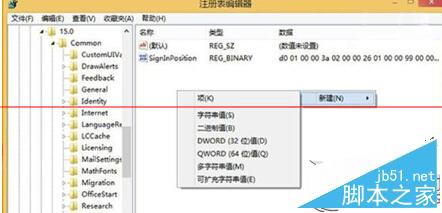
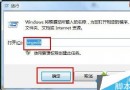
  1. 執行 regedit 開啟登錄編輯器。
  2. 導覽至:
    HKEY_CURRENT_USER\Software\Microsoft\Office\15.0\Common\SignIn
  3. 右鍵新增 DWORD (32-bit) 值 命名 SignInOptions。
  4. 雙擊修改數值資料:
    0 = 允許 Microsoft 帳號與組織帳號 (預設)
    1 = 僅允許 Microsoft 帳號
    2 = 僅允許組織帳號
    3 = 禁用 Microsoft 帳號與組織帳號 (僅本機離線使用)

SignInOptions 登錄設定

設定完成後重新啟動 Office 應用程式生效。配合群組原則可實現全網域統一管控。

Copyright © Windows教程網 All Rights Reserved