Windows XP Windows 7 Windows 2003 Windows Vista Windows 綜合教學 Linux 系統教學
Windows 10 Windows 8 Windows 2008 Windows NT Windows Server 電腦軟體教學
您现在的位置: Windows教程網 >> Windows教程 >  >> Windows 綜合教學 >> 關於 Windows

Win10 開機預設開啟數字鍵盤 (NumLock) 登錄表修改教學

編輯:關於 Windows

Win10 重開機後數字鍵盤預設關閉,需每次手動按 NumLock,透過登錄表設定開機自動開啟:

  1. 工作列搜尋 Regedit 開啟登錄編輯器。
  2. 瀏覽至 HKEY_USERS\.DEFAULT\Control Panel\Keyboard。
  3. 雙擊 InitialKeyboardIndicators,將數值從 2147483648 改為 2 (僅開啟 NumLock)。
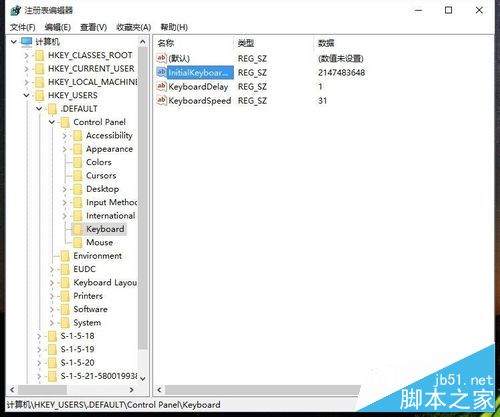
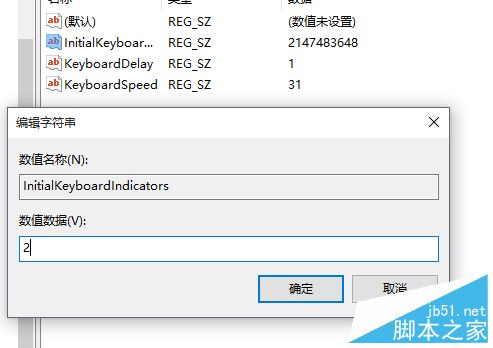
  4. 重開機生效。

數值對照表:

  • 0 = 全關、1 = CapsLock、2 = NumLock、3 = Caps+Num、4 = ScrollLock、5 = Caps+Scroll、6 = Num+Scroll、7 = 全開

亦可在 BIOS 中設定 NumLock Status = Enabled (視主機板支援)。恢復預設只需將值改回 2147483648。

相關推薦: 數字鍵盤無法輸入數字、Win7 NumLock 失效、Win10 10122 數字鍵盤無法使用。

Copyright © Windows教程網 All Rights Reserved