Windows XP Windows 7 Windows 2003 Windows Vista Windows 綜合教學 Linux 系統教學
Windows 10 Windows 8 Windows 2008 Windows NT Windows Server 電腦軟體教學
您现在的位置: Windows教程網 >> Windows教程 >  >> Windows 綜合教學 >> 關於 Windows

Win10 更新 Flash Player 失敗 0x80070002?清除更新快取與檢查服務

編輯:關於 Windows

Win10 透過 Windows Update 更新 Adobe Flash Player 時遇到 0x80070002 錯誤,通常為更新快取損毀或相關服務未啟動。提供完整修復流程:
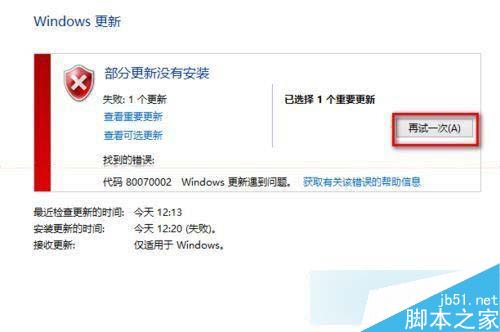
步驟一:清除 Windows Update 快取

  1. 右鍵開始按鈕 → 「命令提示字元(系統管理員)」。
  2. 執行 net stop wuauserv 停止更新服務。
  3. 刪除 C:\Windows\SoftwareDistribution\Download 與 DataStore 資料夾內所有檔案。
  4. 執行 net start wuauserv 重新啟動服務。
  5. 開啟 Windows Update 重新檢查更新。

步驟二:確認關鍵服務啟動類型為自動/手動且已執行

開啟 services.msc,逐一檢查並啟用:

  • Background Intelligent Transfer Service (BITS)
  • Windows Installer
  • Cryptographic Services
  • Software Licensing Service
  • Windows Update

每項服務:雙擊 → 「一般」頁籤 → 啟動類型選「自動」或「手動」 → 點擊「啟動」→ 確定。

完成上述步驟後,Flash Player 及其他補丁更新即可正常進行。此法適用於所有 0x80070002 更新錯誤。

Copyright © Windows教程網 All Rights Reserved