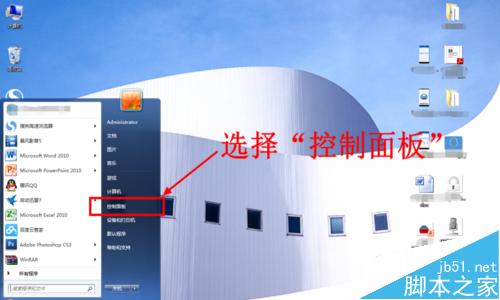
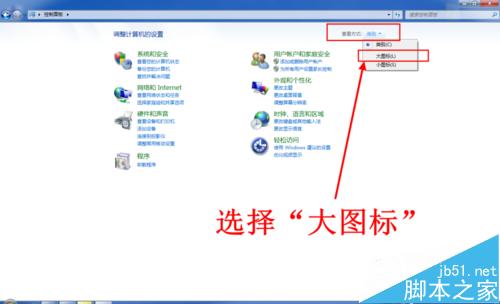
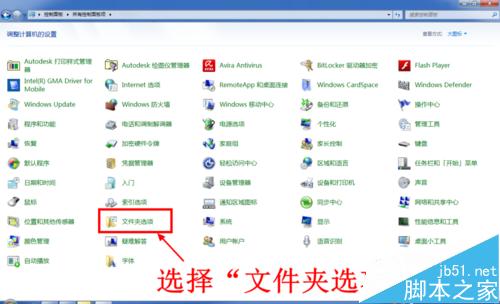
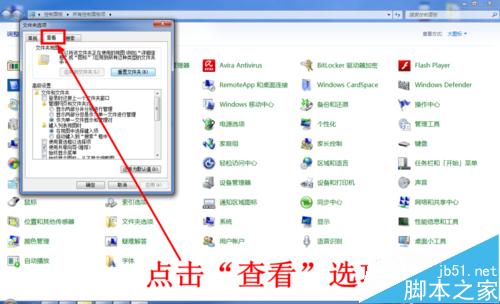
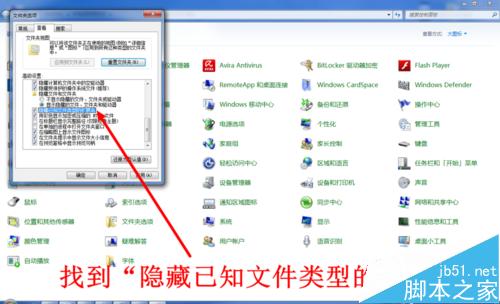
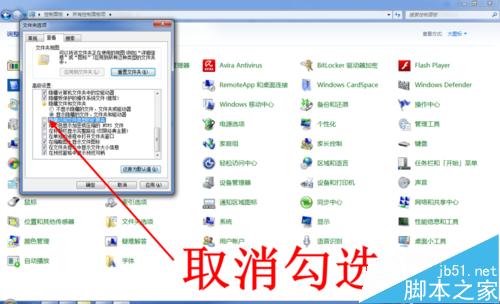
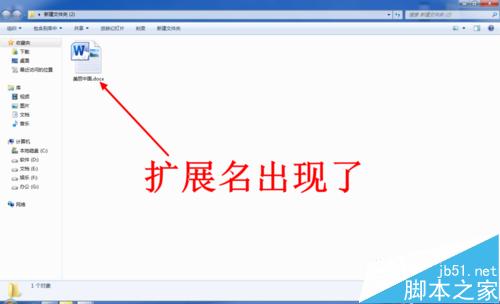
預設 Windows 隱藏已知檔案類型的副檔名,若需顯示以利辨識:
.txt
.exe
.jpg
Win10 10240 右鍵「新增」次選單過多?軟媒魔方一鍵精簡
微軟加快 Win10 Mobile 推送頻率:內部正測試新預覽版,核心品質為首要目標
Win10 無法識別路由器掛載硬碟?一招修改登錄檔輕鬆解決
Win8/8.1快速啟動失效?電源選項「取消勾選→重新勾選」重置快速啟動狀態一鍵修復
Windows 8 Metro 介面啟用「以其他使用者身分執行」:群組原則新增右鍵選單指令
Windows 10 檔案總管預設開啟位置修改教學:自訂啟動資料夾
Windows 7 登入畫面顯示上次登入資訊:群組原則啟用稽核誰動過電腦
Win10 KB3124200 安裝報錯 8024401a?官方離線安裝包 (MSU) 直達下載