Windows XP Windows 7 Windows 2003 Windows Vista Windows 綜合教學 Linux 系統教學
Windows 10 Windows 8 Windows 2008 Windows NT Windows Server 電腦軟體教學
您现在的位置: Windows教程網 >> Windows教程 >  >> Windows 綜合教學 >> 關於 Windows

Win10 登錄檔關閉滑鼠加速度設定教學

編輯:關於 Windows

滑鼠加速度會導致相同物理移動距離下,移動越快游標位移越遠,不利 FPS 等遊戲精準操作。透過登錄檔可完全關閉加速度。

設定路徑

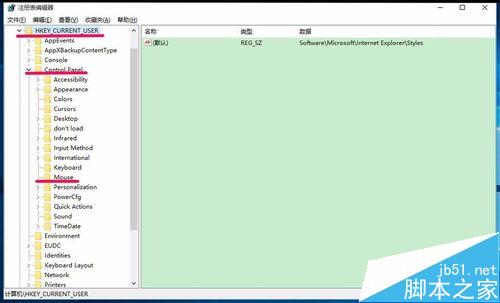
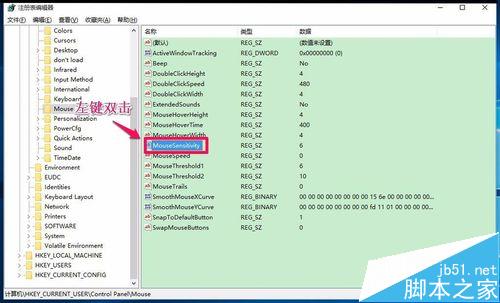
HKEY_CURRENT_USER\Control Panel\Mouse

修改步驟

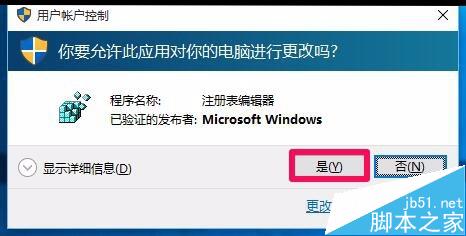
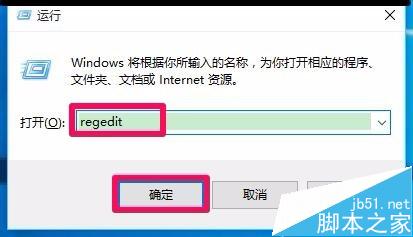
  1. 開啟登錄編輯器,依路徑展開至 Mouse
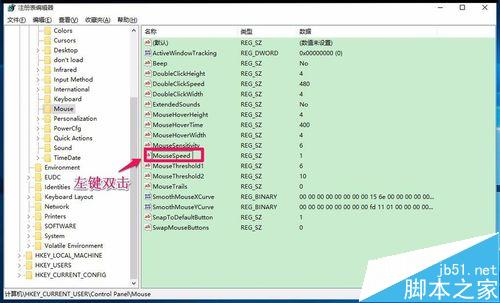
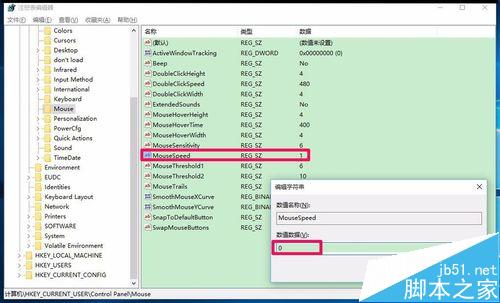
  2. 雙擊 MouseSpeed,數值改為 0(0=無加速,1=2倍速,2=4倍速)
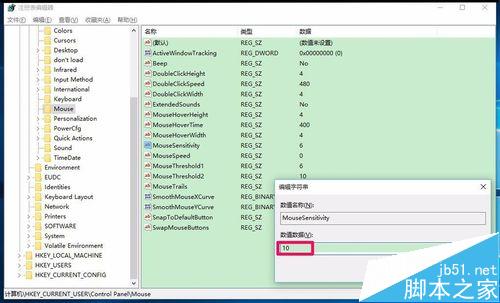
  3. 雙擊 MouseSensitivity,數值改為 10
  4. 重新開機生效

驗證方法

將滑鼠貼緊鍵盤右側記住游標位置,慢速向右移動一段距離後快速移回原處:游標回到原位 = 無加速;略差一點 = 無加速但有掉幀;超過原位約 1 倍 = 有加速。
設定完成後可獲得更線性的滑鼠操控體驗。

Copyright © Windows教程網 All Rights Reserved