Windows XP Windows 7 Windows 2003 Windows Vista Windows 綜合教學 Linux 系統教學
Windows 10 Windows 8 Windows 2008 Windows NT Windows Server 電腦軟體教學
您现在的位置: Windows教程網 >> Windows教程 >  >> Windows 綜合教學 >> 關於 Windows

微軟官方教學:登錄修改封鎖 Win10 升級通知圖示(GWX),Win7/8.1 適用

編輯:關於 Windows

微軟透過 KB3035583 更新推送「取得 Windows 10」App (GWX),持續彈窗催促升級。官方低調提供登錄封鎖法,徹底停用升級通知與自動下載。

官方封鎖步驟

  1. Win + R 輸入 regedit 開啟登錄編輯器。
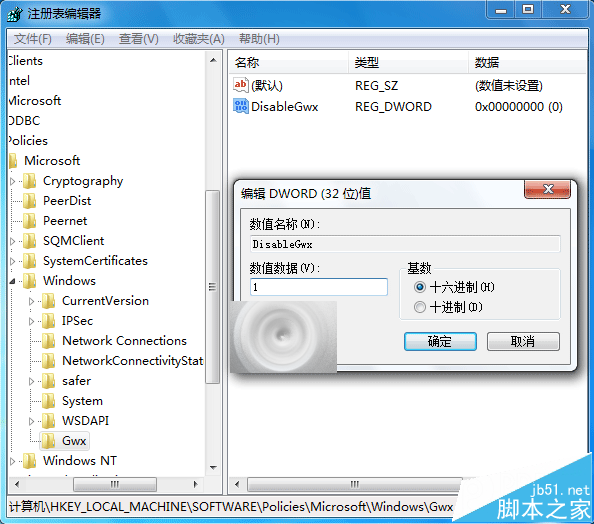
  2. 導航至:
    HKEY_LOCAL_MACHINE\SOFTWARE\Policies\Microsoft\Windows\Gwx
    (若路徑不存在,請手動新增金鑰)。
  3. 右鍵空白處 → 新增 → DWORD (32 位元) 值,命名為 DisableGwx。
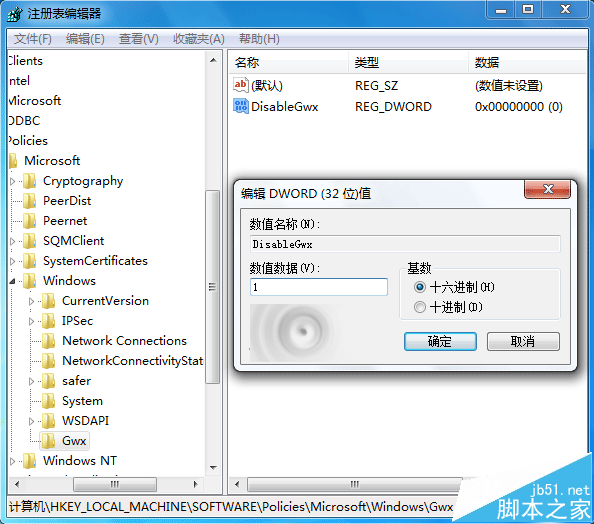
  4. 雙擊 DisableGwx,數值資料改為 1,確定。
  5. 重開機生效,GWX 升級通知徹底消失。

恢復通知:刪除 DisableGwx 值並重開機即可。

替代方案:卸載 KB3035583、KB2952664、KB3021917 等相關更新並「隱藏」更新,但微軟可能推送新版更新繞過,登錄法較徹底。

建議:修改登錄前用「軟媒魔方」等工具備份登錄,以防操作失誤。

延伸閱讀: Win10 升級提示圖示四種關閉法 | 電腦右下角 Win10 免費升級提示怎麼刪除? | Windows10 正式版升級檔案 $Windows.~BT 在哪裡?

Copyright © Windows教程網 All Rights Reserved