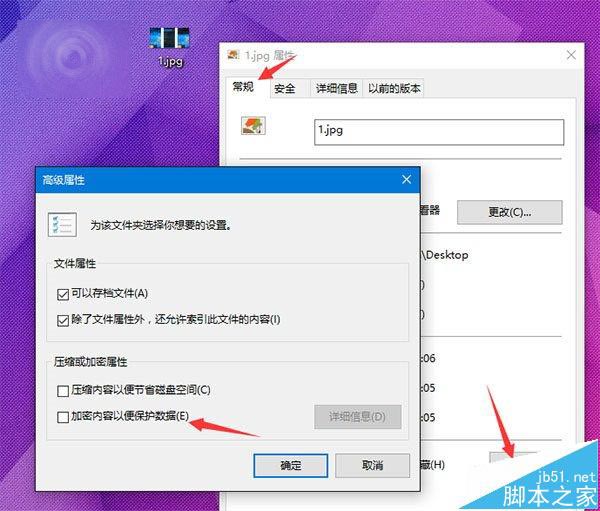
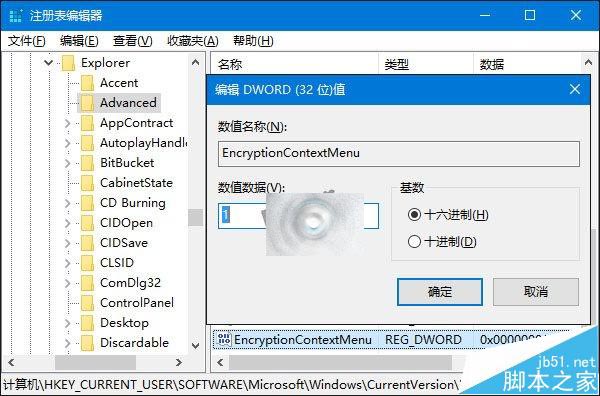
Windows 內建加密檔案系統 (EFS) 可保護個別檔案/資料夾,但預設需進入屬性→進階勾選,步驟繁瑣。修改登錄即可在右鍵選單直接顯示「加密/解密」選項。
regedit
HKEY_CURRENT_USER\Software\Microsoft\Windows\CurrentVersion\Explorer\Advanced
移除方法:刪除建立的 EncryptionContextMenu 鍵值即可恢復原狀。
EncryptionContextMenu
Win7 輸入法全形/半形切換熱鍵無法修改?登錄編輯器強制設定 Ctrl+\ 解決
Windows 10 開機密碼設定與取消完整圖文教學
Win10 安裝 AutoCAD 2011 開啟閃退?完整清除殘留檔案與登錄檔重裝教學
Win10 Edge 瀏覽器下載亂碼解決:組策略強制設置 User-Agent 為 MSIE 9.0
Windows 7 共用印表機 0x000006d9 錯誤解決啟用防火牆服務
Windows 7 架設 VPN 伺服器讓他人連入完整教學
微軟 Win10 SDK 10166 中文版下載:Bug 修復、Surface API 變更、已知問題與解決方案
Win8 設定桌面圖示大小與解析度:適合圖示堆積族的完整調整指南