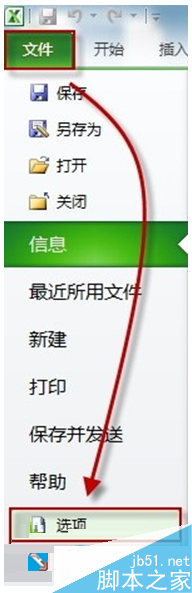
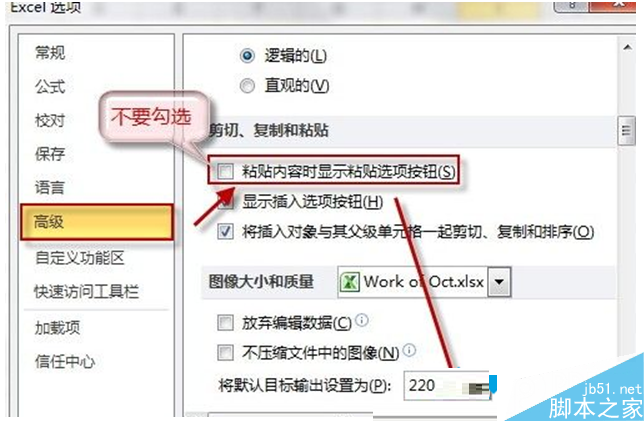
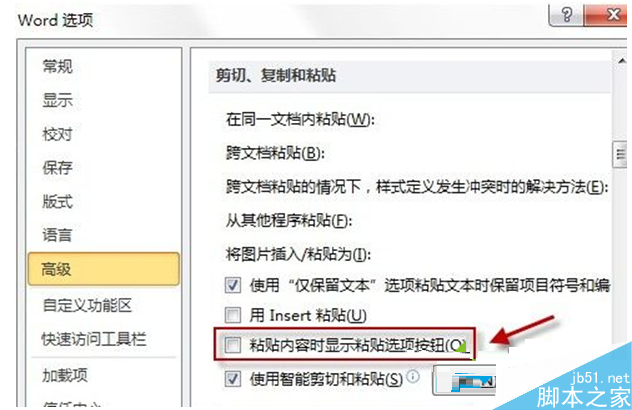
Win7 下 Word、Excel 貼上內容時滑鼠旁總出現「Ctrl」貼上選項圖示,干擾視線。只需在「檔案」→「選項」→「進階」中取消勾選「貼上內容時顯示貼上選項按鈕」,即可同時隱藏 Word 與 Excel 的該按鈕 (Office 套件共用設定)。
設定完成後,貼上內容不再彈出 Ctrl 選項按鈕,畫面更乾淨。
Win10 不登入 Microsoft 帳戶也能下載應用:應用商店僅登入商店帳戶即可
Win10 Build 10576 升級後已知問題完整彙總:音量降低、訊息應用遺失聯絡人、Surface Pro 3 睡眠異常等
Win7 如何結束 dwm.exe 釋放記憶體?停用 Desktop Window Manager 服務教學
Win10 啟用內建 Administrator 管理員帳號圖文教學
Win10 網路圖示出現黃色驚嘆號?修改登錄檔移除標記教學
Win10 更改音樂/圖片/影片/文件預設儲存位置:儲存感知一鍵導向非系統碟
錯過免費期限怎麼辦?用輔助技術通道免費升級 Win10 完整教學
Win7 安裝 Windows Virtual PC 與 XP Mode 完整圖文教學