網站設計需用 IIS 發布,Win7 系統如何開啟 IIS 服務?下面詳細介紹:
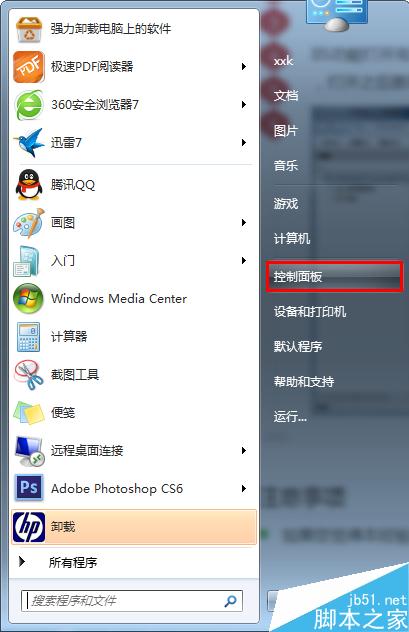
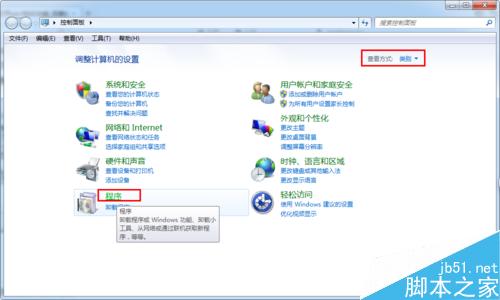
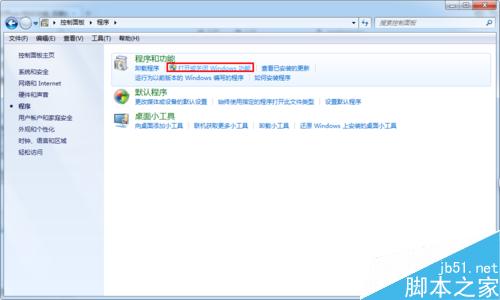
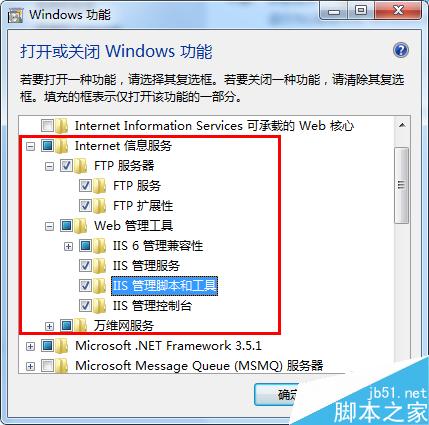
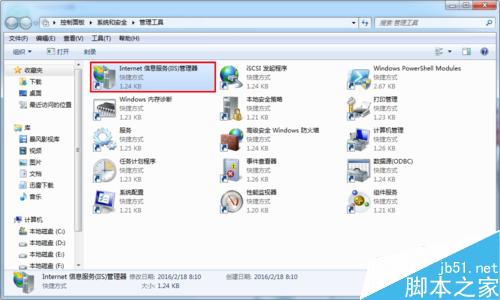
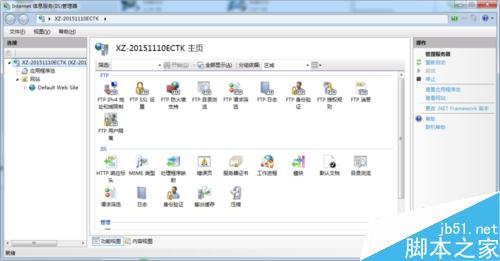
以上就是 Win7 開啟 IIS 服務方法,操作簡單,希望能幫助大家!
Win8.1/Win10 回歸經典:下載 Win7 風格系統設定 (msconfig) 工具
Windows 10 手機版發布時間:預計 9 月底,運營商測試可能延後
Windows 磁碟檔案系統完整比較:FAT、FAT32、NTFS、exFAT 優缺點與選擇指南
Windows 7 如何禁止網頁自動播放背景音樂?調整音量合成器與 Internet 選項雙重封鎖
Win10 Mobile 14946 升級錯誤 0x80188319?微軟已修復,裝語言包用戶可再嘗試更新
無法刪除的頑固資料夾?BAT 強力刪除指令一鍵解決「找不到項目」