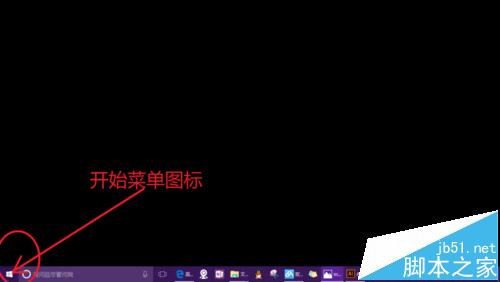
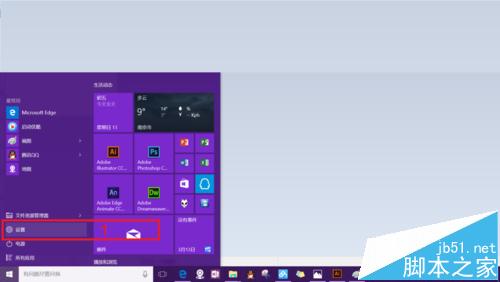
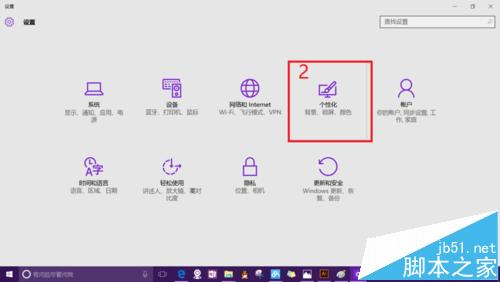
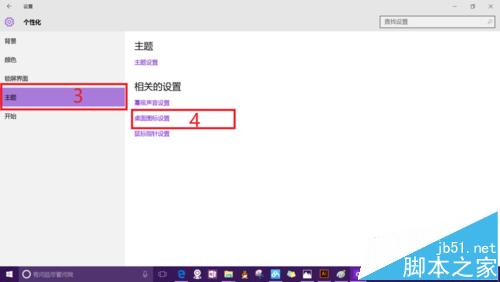
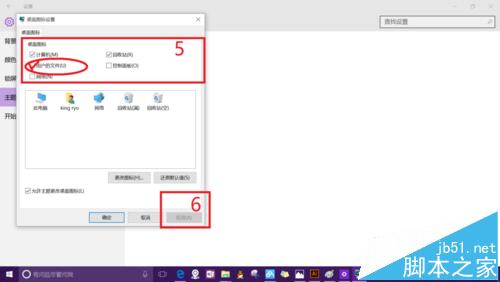
Win10 預設桌面不顯示「我的文件」(現稱「使用者的檔案」)、電腦、回收站等系統圖示,啟用方法:
取消勾選可隱藏對應圖示,靈活調整桌面整潔度。
Windows Server 2008 啟用音訊服務:讓伺服器播放聲音的兩步驟設定
Win7 啟用 DMA 模式提升硬碟存取效能教學
8 吋以下裝置升級 Win10 無桌面模式:僅支援 Modern 應用
Win8 IE10 收藏夾漫遊功能設定:切換 Microsoft 帳戶、開啟同步開關、雲端即時同步收藏網址
新電腦裝 Win10 還是 Win7?綜合優缺點分析與購機建議
Windows 10 媒體播放五大變革:原生支援 FLAC/MKV/HEVC、投射取代播放到、DVD 需付費
Win7 開機藍屏/報錯 0xc0000102?chkdsk /f 修復磁碟檔案系統錯誤
Windows XP 控制台部分功能自動關閉無法使用?註冊元件、安全模式修復、系統檔案掃描三大修復方案