Windows XP Windows 7 Windows 2003 Windows Vista Windows 綜合教學 Linux 系統教學
Windows 10 Windows 8 Windows 2008 Windows NT Windows Server 電腦軟體教學
您现在的位置: Windows教程網 >> Windows教程 >  >> Windows 綜合教學 >> 關於 Windows

Win7 升級 Win10 後 IE/Edge 無法播放影片?啟用 Flash Player 與更新插件

編輯:關於 Windows

解決方法

IE 瀏覽器

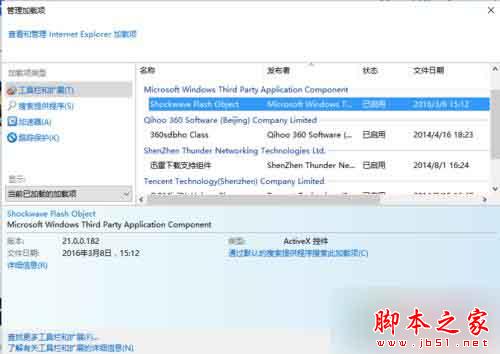
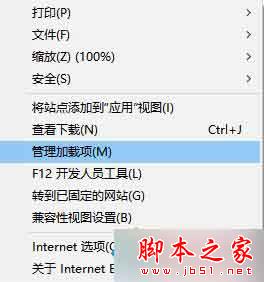
  1. 設定 → 「管理附加元件」→ 找 Shockwave Flash Object → 若為「停用」改為「啟用」
Edge 瀏覽器

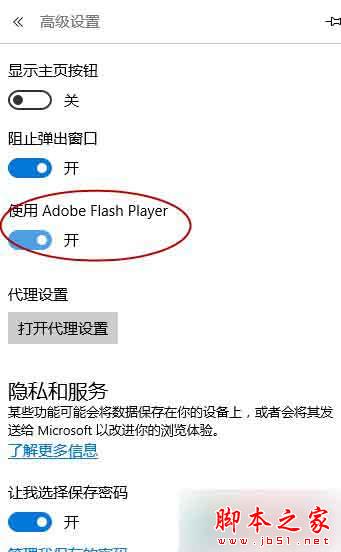
  1. 右上角三點 → 「設定」→ 「進階設定」→ 開啟「使用 Adobe Flash Player」

若仍無效:更新 Flash Player

升級 Win10 前未更新 Flash 導致不相容。用 360/騰訊管家還原舊版 → 官網下載最新 Flash 或管家更新 Flash → 重新升級 Win10,即可正常播放。

相關閱讀

  • Win7 如何用虛擬機執行 Win10?
  • Win7/Win8.1/Win10 設定 Java 環境變數教學
Copyright © Windows教程網 All Rights Reserved