Windows XP Windows 7 Windows 2003 Windows Vista Windows 綜合教學 Linux 系統教學
Windows 10 Windows 8 Windows 2008 Windows NT Windows Server 電腦軟體教學
您现在的位置: Windows教程網 >> Windows教程 >  >> Windows 綜合教學 >> 關於 Windows

Win8 IE 瀏覽器關閉 GPU 硬體加速,解決線上影片播放異常

編輯:關於 Windows

IE 瀏覽器預設開啟 GPU 硬體加速,但在部分顯卡驅動不相容時會導致線上影片畫面閃爍、綠畫面、聲畫不同步。關閉 GPU 加速改用軟體繪製即可解決。

設定步驟

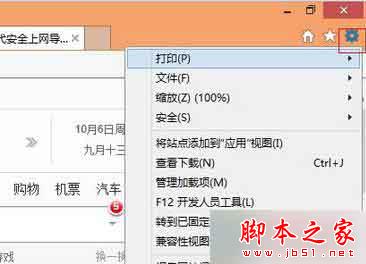
  1. 開啟 IE,點擊右上角 齒輪圖示 → 「網際網路選項」。
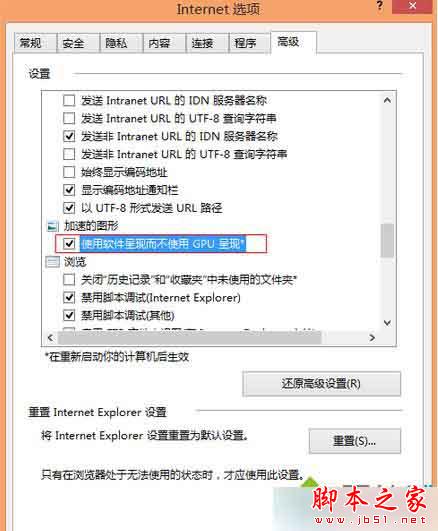
  2. 切換到 「進階」 索引標籤。
  3. 在設定清單中找到 「使用軟體轉譯而非 GPU 轉譯」,打勾啟用。
  4. 按 「確定」 套用,重新啟動 IE 生效。

補充說明

  • 此設定僅影響 IE,不影響 Edge 或其他瀏覽器。
  • 關閉 GPU 加速可能增加 CPU 負載,但能大幅提升影片播放相容性。
  • 建議同步更新顯卡驅動至最新版,長期解決相容問題。
Copyright © Windows教程網 All Rights Reserved