Windows 8 安裝 Office 2007 提示 Osetup.DLL digital signature does not validate or is not present,需從安裝包 CAB 檔案提取正確的 Osetup.dll 覆蓋。
E:\Office2007\ProPlus.WW\Osetup.DLL)。ProPlus.WW.cab (約 260 MB)。osetup.dll。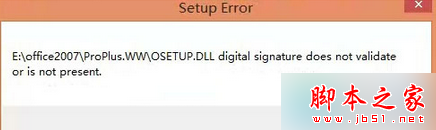
此法可解決 Office 2007 在 Windows 8 上安裝的數位簽章驗證失敗問題。
Windows Server 2003 架設 WSUS 服務器完整指南
Windows 10 筆電搜尋不到 Wi-Fi 熱點?診斷啟動 WLAN AutoConfig 服務秒解決
Win10 Mobile 10536 已知問題彙總:通知延遲、zStorage 崩潰、OneDrive 上傳異常、通道切換限制
XP 刪除印表機提示「後台列印服務未執行」解決:啟動 Print Spooler 服務
Win10 新增撥號上網 (PPPoE) 完整圖文教學,解決寬帶連線問題
Win7 限制網卡速率教學:將頻寬鎖定 10Mbps 全雙工,保障區域網公平用網
Win10 郵件與行事曆 17.6224.42271 更新內容:專注修復 Bug,收件匣通知延遲、HTML 郵件渲染異常等問題持續改善