Windows 7 關機時彈出「Dwwin.exe 初始化失敗」,Dwwin.exe 為系統錯誤回報工具 Dr.Watson (華生醫生) 的執行檔。修改登錄關閉自動偵錯功能即可消除錯誤。
regedit 開啟登錄編輯器。HKEY_LOCAL_MACHINE\SOFTWARE\Microsoft\Windows NT\CurrentVersion\AeDebugAuto 字串值,將數值資料從 1 改為 0。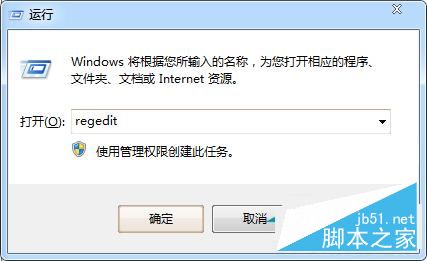
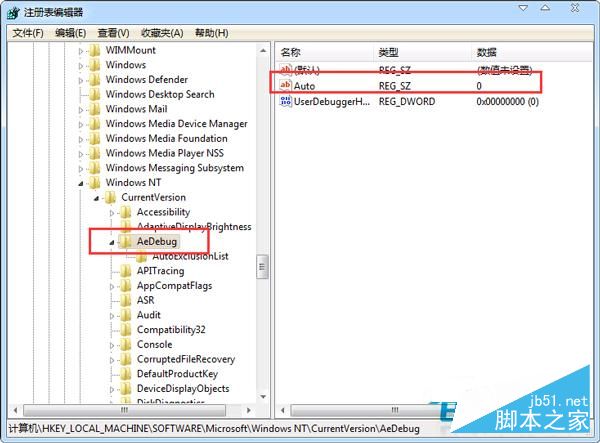
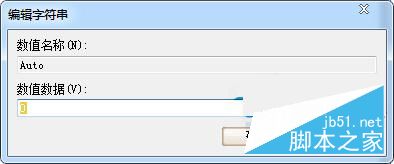
此修改僅關閉程式當機時的自動偵錯回報,不影響系統穩定性。若需偵錯可改回 1 或使用 WinDbg 等專業工具。
Win10 10547 版開始選單新功能:啟用「顯示更多磚」擴展至四欄佈局
Win10 Windows Defender 無法開啟?檢查服務路徑或管理員命令提示字元執行 sc start WinDefend Enable
Win7 開機報 DSDSARK.sys 損壞無法進入系統?安全模式刪除該檔案即可恢復
Win10 10576 版 disksnapshot.exe 定時彈出 CMD 視窗解決:停用排程任務
Win7 設定自動關機:工作排程器建立基本任務 + shutdown 指令參數
XP 系統安裝還原軟體 (冰點還原/還原卡) 導致重開機軟體消失?三種解除保護方法恢復正常