微軟於 6 月 2 日推送 Win10 Mobile 週年更新預覽版 14356,最大亮點在於開啟手機與 PC 通知同步功能,透過 Cortana 小娜實現跨裝置通知互通。本文詳細說明啟用條件與操作步驟。
功能亮點
- 手機端開啟 Twitter 等社交應用通知同步後,PC 端即時接收通知
- 支援 UWP 應用快速回覆:在電腦上直接回覆手機訊息、簡訊
- 同步內容涵蓋:簡訊、來電未接、低電量提醒、尋找手機、社交應用通知等
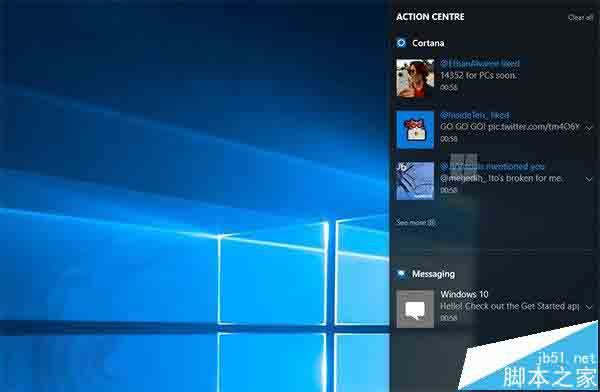
啟用前提條件
- 手機升級至 Win10 Mobile 14356 或更新版本
- PC 升級至 Windows 10 14352 或更新版本
- 雙裝置均登入相同 Microsoft 帳號
啟用步驟
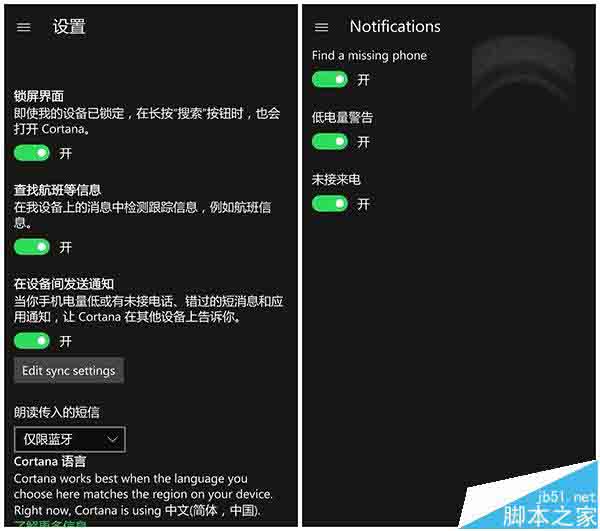
- 在手機上開啟 Cortana 設定
- 點選 「編輯同步通知」
- 開啟所需同步項目:未接來電、低電量、尋找手機、社交應用等
- 確認 PC 端 Cortana 同樣啟用相關權限
此功能為 Win10 週年更新重點特色之一,預計夏季正式版推出時全面開放。目前仍在測試完善階段,部分應用支援度可能有限。
相關推薦
- Win10 Mobile 快速預覽版 14356.1000 推送詳情
- Win10 Mobile 14356 修復 Bug 與已知問題彙總
- Win10 Mobile 14356 新增英雄壁紙使用教學