Windows XP Windows 7 Windows 2003 Windows Vista Windows 綜合教學 Linux 系統教學
Windows 10 Windows 8 Windows 2008 Windows NT Windows Server 電腦軟體教學
您现在的位置: Windows教程網 >> Windows教程 >  >> Windows 綜合教學 >> 關於 Windows

Win10 更新錯誤 0x80240016 解決:重啟 Windows Update 服務兩行指令搞定

編輯:關於 Windows

Win10 正式版推送更新時出現錯誤碼 0x80240016,通常是 Windows Update 服務卡住。用 CMD 重啟服務即可恢復更新。

解決指令

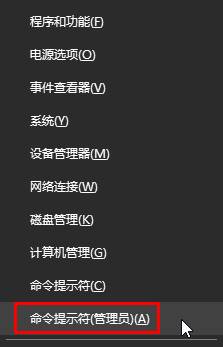
  1. 右鍵開始按鈕 → 命令提示字元 (系統管理員)。
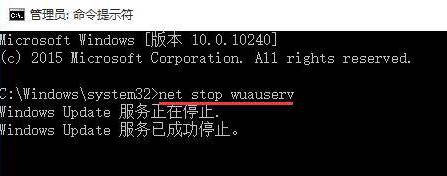
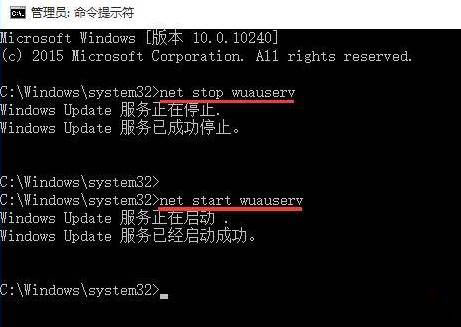
  2. 依序執行:
    net stop wuauserv (等待「服務已成功停止」)
    net start wuauserv (等待「服務已成功啟動」)
  3. 重新開機 → 設定 → 更新與安全性 → 檢查更新。

原理

wuauserv (Windows Update 服務) 偶爾會進入死結狀態,導致更新協調失敗。重啟服務可清除暫存狀態、重新連線更新伺服器。

若仍失敗

  • 執行 sfc /scannow 修復系統檔案。
  • 刪除 C:\Windows\SoftwareDistribution\Download 內容重新下載更新。

  • 使用微軟官方「Windows Update 疑難排解工具」。
Copyright © Windows教程網 All Rights Reserved