Windows XP Windows 7 Windows 2003 Windows Vista Windows 綜合教學 Linux 系統教學
Windows 10 Windows 8 Windows 2008 Windows NT Windows Server 電腦軟體教學
您现在的位置: Windows教程網 >> Windows教程 >  >> Windows 綜合教學 >> 關於 Windows

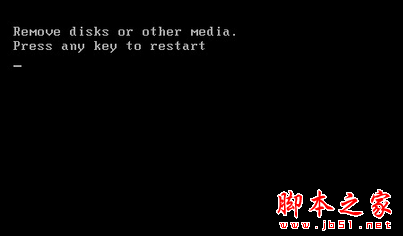
Win7 開機黑屏提示「Remove disks or other media」五大原因與對應解法

編輯:關於 Windows

Win7 開機黑屏顯示 Remove disks or other media, Press any key to restart 無法進入桌面,五大常見原因與解法:

  1. 硬碟/光碟機跳線錯誤 → 檢查並修正主從/排列跳線。
  2. BIOS 開機順序錯誤 → 進入 BIOS 將硬碟設為第一開機裝置。
  3. 光碟機/硬碟損壞 → 更換或維修故障硬體。
  4. 無軟碟機但 BIOS 未關閉 → BIOS 中將 Floppy 設為 Disabled/None。
  5. 外接 USB/光碟干擾 → 移除所有 USB 隨身碟/光碟後重開機。

多數屬硬體或 BIOS 設定問題,定期維護硬體可預防。

Copyright © Windows教程網 All Rights Reserved