新購筆電預裝 Windows 10 家用版,預設閒置一段時間即進入休眠,若需永久關閉休眠功能,透過命令提示字元輸入單一指令即可完成,無需進繁複的控制台設定。
powercfg -h off 並按 Enter。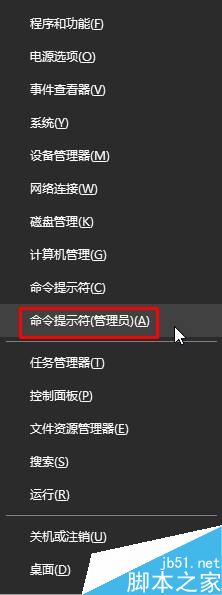
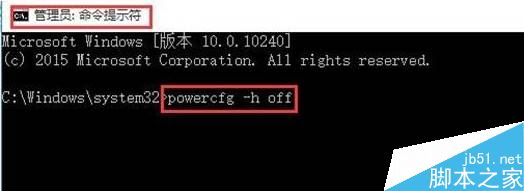
執行後即刻生效,系統不再產生 hiberfil.sys 休眠檔案,也能釋放相當於實體記憶體大小的磁碟空間。若未來需恢復休眠功能,僅需執行 powercfg -h on 即可。
Win10 Mobile/PC 預覽版 14951 更新內容詳解:觸控板、Windows Ink、相機、WSL 全面升級
Windows 7 取消開機登入畫面直接進入桌面:control userpasswords2 與登錄/群組原則替代方案
Win7 Excel 輸入身分證字號變科學符號?三招設定儲存格格式完美解決
IE 瀏覽器頻繁彈出「已停止運作」?本地安全性原則封鎖 werfault.exe 徹底解決
Windows 10 10159 升級到 10162 完整教學:簡化為三階段,約 30 分鐘完成
Win7 開機報錯「遺失 UxTheme.dll」無法進入桌面?安全模式 SFC 修復 + 手動替換檔案雙重保險
Windows 10 Build 9879 新功能曝光 (一) : IE11 工具列新增笑臉回饋按鈕,指向 modern.ie 官網回報相容性問題