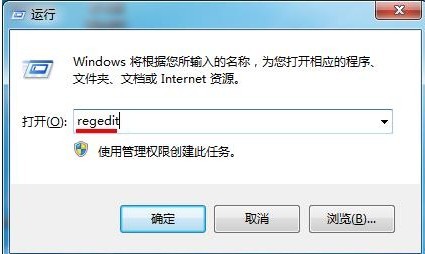
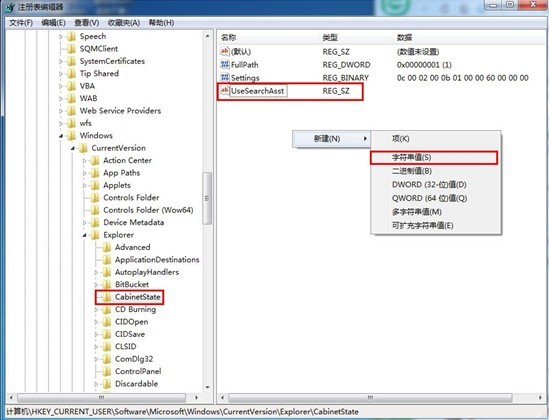
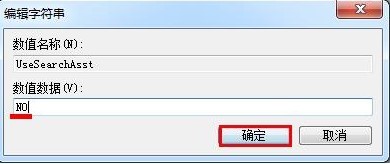
Win7 搜尋失效修復:Win+R → regedit → 定位 HKEY_CURRENT_USER\Software\Microsoft\Windows\CurrentVersion\Explorer\CabinetState → 右鍵新增字串值 UseSearchAsst → 數值設為 NO → 確定。重開總管或重開機即恢復搜尋功能。
regedit
HKEY_CURRENT_USER\Software\Microsoft\Windows\CurrentVersion\Explorer\CabinetState
UseSearchAsst
NO
Windows 10 Store 企業優化功能:統一跨平台商店、網頁端部署、MDM 整合應用生命週期管理
Win10 CPU 佔用過高、運行卡頓?三大優化方案降低負載
Windows 10 正式版免費升級 19 大常見問答完整整理:資格、預約、版本對應、相容性一次搞懂
Win10 正式版大量蒐集隱私?九大類設定教你徹底阻止追蹤
Windows 10「這台電腦」設備與磁碟機出現大量第三方圖示?註冊表一鍵清除所有多餘項目
Win10 Build 14279 詳細評測:Cortana、訊息+Skype、登入畫面全新體驗
Win10 另類升級技巧:複製 $Windows.~BT 到非系統盤運行 setupprep 安裝
Win10 1607 累積更新失敗卡住?刪除 XblGameSave 資料夾與登錄表項目後重試