Windows 7 旗艦版/專業版/企業版可透過「本地使用者和群組」啟用內建 Administrator 帳號;家用版無此工具,需使用命令行替代。
lusrmgr.msc 開啟「本地使用者和群組」。Administrator → 右鍵「內容」。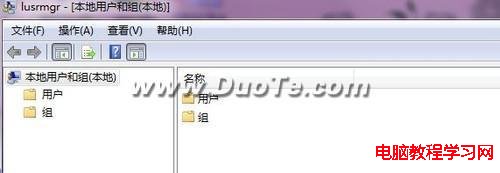

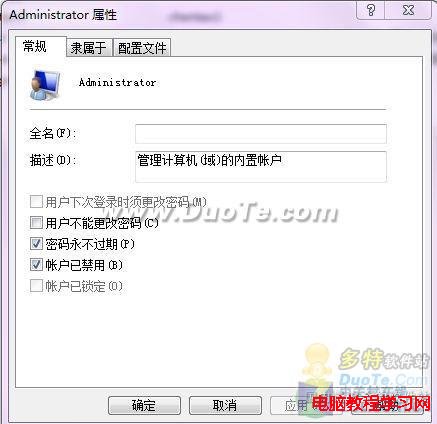
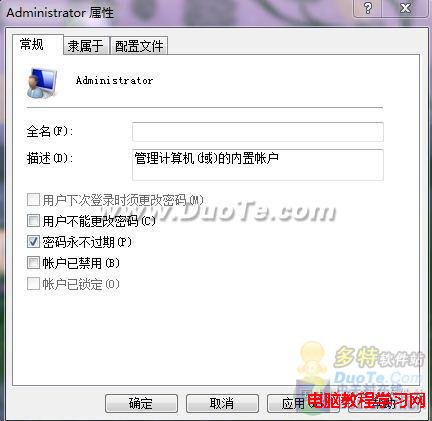
net user administrator /active:yesnet user administrator /active:no注意:啟用內建管理員帳號會降低系統安全性,僅建議臨時維護使用,平時請保持停用狀態。
升級 Win10 14393 失敗報 0xc1900101-0x40017?關閉 .NET Framework 4.6 進階服務後重試
Windows Phone 正式更名為 Windows 10:跨平台統一體驗,品牌走入歷史
Windows 8.1 將 SkyDrive 資料夾加入使用者程式庫:桌面重導向、OneNote 整合、共用筆記本至雲端三大應用場景
Win7 登入 DNF 出現 tcls parsing failed 錯誤?修復 TCLS 客戶端一鍵解決
Win7 調整 CF 煙霧頭看穿濃霧,顯示卡設定 16 位色 + 遊戲亮度 50
Windows 10 9926 手動切換平板模式與桌面模式完整教學