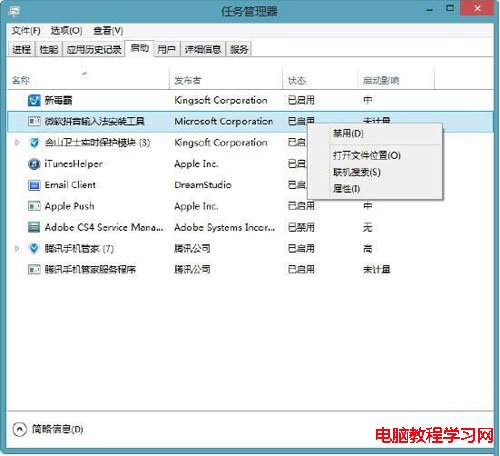
軟體裝多開機變慢?三種快速進入啟動項管理:
msconfig
停用多餘啟動項,開機速度恢復如初,三種管道任選最順手者。
Win10 AMD 顯卡「應用程式設定模式」開啟遊戲停止運作 解決方法
Win10 工作列自動隱藏、移動位置、按鈕樣式完整設定圖解
Win8.1 輸入法圖示消失?啟用「輸入指示器」系統圖示找回
修改 Windows 8 視窗標題列字型大小
Win8 設定 4 碼 PIN 碼登入,比密碼更快、更安全、可頻繁變更
Win10 Mobile 10536.1004 快速版開始推送:雙軌升級路徑 (10514 過渡版 + 10536 最新版)、電量 40% 以上、Wi-Fi 下載
Win10 Build 10105/10107 同台演示:升級版開始功能表、跳躍清單、Cortana 新介面、Edge 閱讀模式內建翻譯
Win7 Word 2010 設定開啟密碼教學:檔案→資訊→保護文件→加密密碼四步完成