筆電為省電預設 10 分鐘自動關閉藍牙,導致藍牙滑鼠斷線。解決:停用藍牙裝置的電源管理選項。
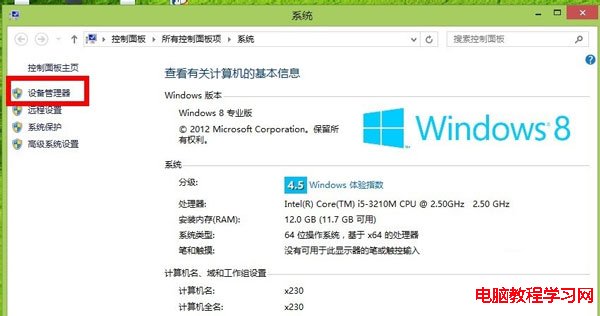
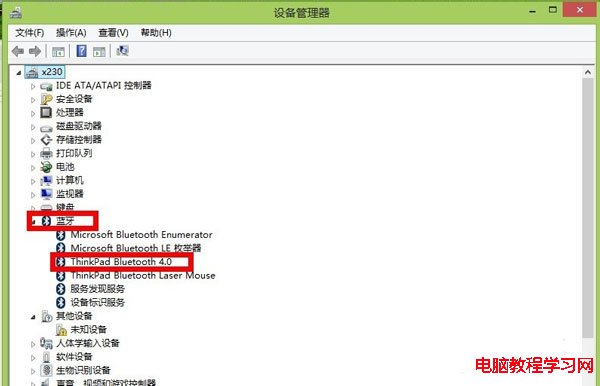
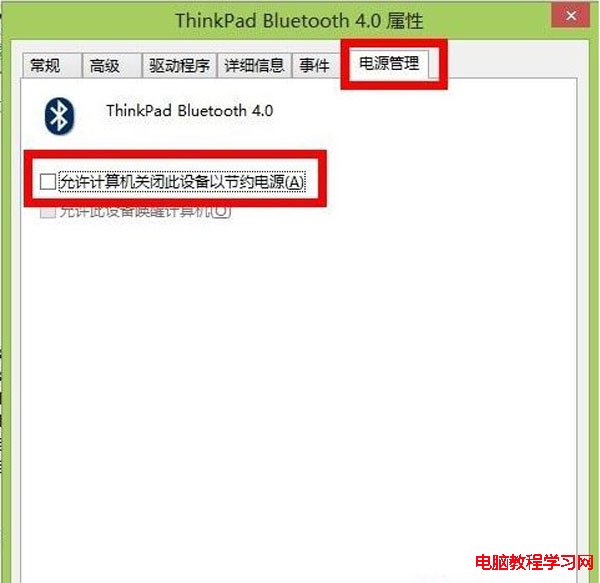
設定後藍牙滑鼠不再因省電斷線,操作更安定。
Win7 內建日文輸入法無法輸入漢字?精簡版系統缺 IME 檔案,補全或改用第三方輸入法
Windows 10 Build 10176 RTM 候選版無浮水印安裝圖文教程
盜版 Windows 用 360/騰訊/官方升級 Win10 真的能洗白嗎?實測三種方式激活情況
Win10 Build 10532 首支上手影片:右鍵選單變黑、Feedback 可分享、Edge 強化
Windows 8/8.1 如何關閉 OneDrive 同步服務?本機群組原則禁用圖文教學
Win10 產品金鑰怎麼用?微軟全新「數位授權」機制詳解:免費升級裝置無需金鑰、零售版/大量授權仍需金鑰啟動