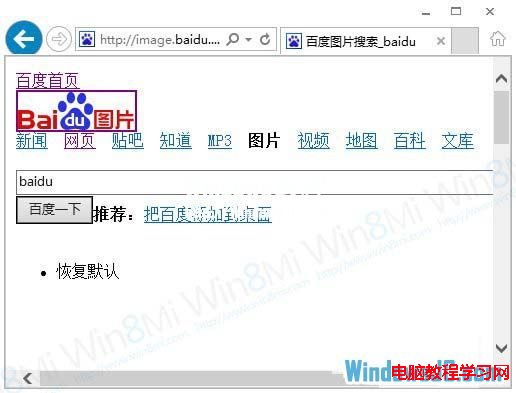
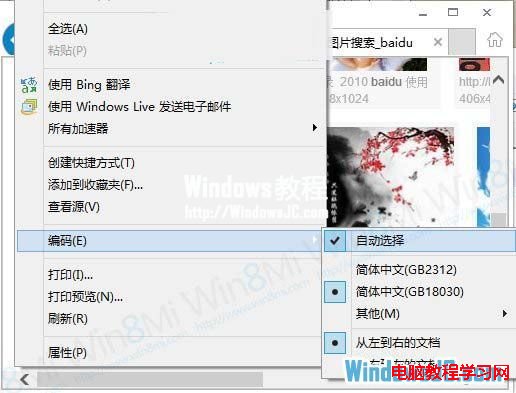
IE10 瀏覽百度圖片時出現「無法顯示此頁」或圖片不顯示,實為百度頁面編碼宣告與 IE10 自動偵測衝突。將編碼設為「自動選擇」即可解決。
此為百度頁面編碼標準不符導致,非 IE10 故障。同樣問題可能出現在其他編碼宣告不標準的網站,同法可解。
Win7 開機藍屏錯誤代碼 0x00000024 故障分析與三階段修復方案
XP 系統搜狗輸入法打不出字/亂碼?三大修復方案(內建修復器、360 救援、重裝)
Win10 內建截圖工具如何設定延遲截圖?最長 5 秒倒數
Windows 10 技術預覽版常用快捷鍵大全:虛擬桌面、分割視窗、新版開始選單
Windows 8 快速關機鍵與方法:Win+I 呼叫電源選單、Alt+F4 經典關機
Win10 週年更新 Desktop App Converter 0.1.22 釋出:支援 Build 14388+ 系統將 Win32 應用轉制為 UWP
升級 Win8.1 提示「無法更新系統保留分區」解決方案
Win8 IE11 阅读视图自定义样式:设置 → 选项 → 阅读视图字体/主题/字号,夜间模式护眼神器