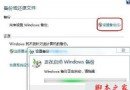
在日常使用電腦時,系統安全防護至關重要。Windows 7 內建的 Windows 防火牆預設自動啟用,雖然平時鮮少需要手動操作,但某些情況(如安裝特定軟體、排除網路連線問題)可能需要暫時關閉或調整防火牆設定。本文將透過詳細圖文步驟,教您快速找到並完成 Win7 防火牆的開啟、關閉與自訂規則設定。
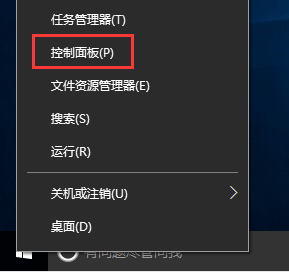
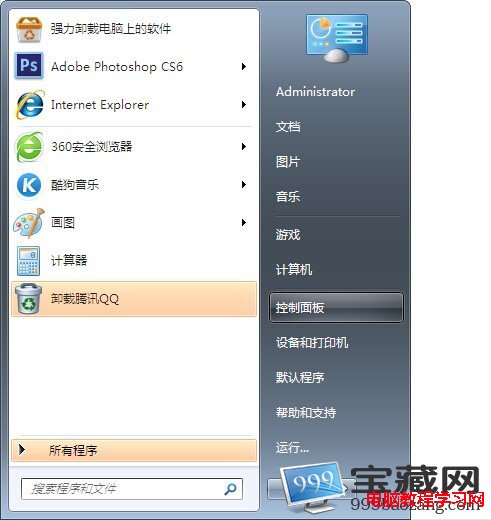
1. 點擊「開始」按鈕,選擇「控制面板」。
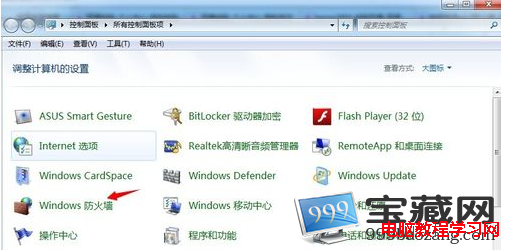
2. 在控制面板中找到並點選「Windows 防火牆」。
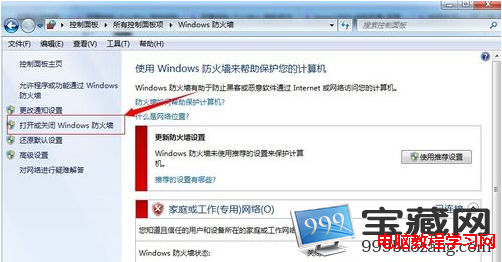
3. 左側選單點選「開啟或關閉 Windows 防火牆」。
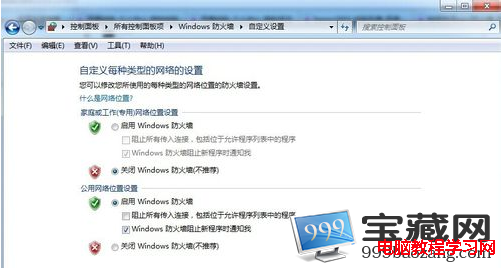
4. 依據需求勾選「開啟 Windows 防火牆」或「關閉 Windows 防火牆」(分別針對家庭/公司網路與公用網路),完成後按「確定」。
防火牆是電腦系統抵禦病毒、木馬入侵的關鍵防線。若因特殊需求必須暫時關閉,請務必在操作完成後立即重新啟用。若關閉後發生系統異常,可參考 Win7 系統修復或系統還原功能嘗試解決。