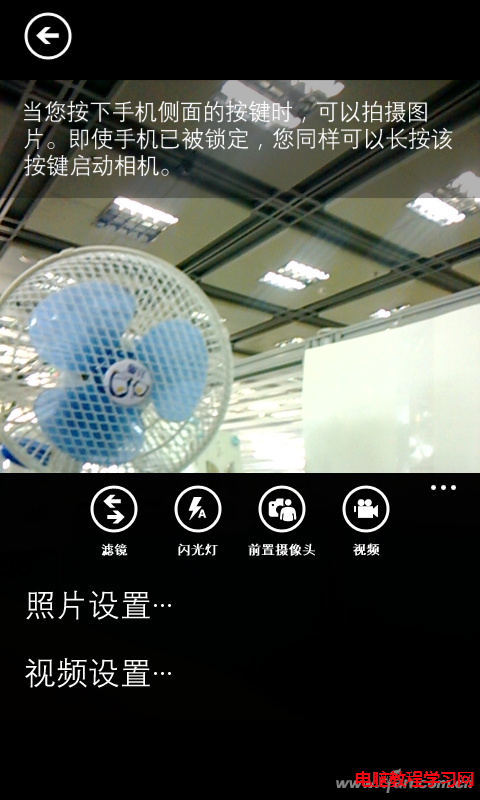
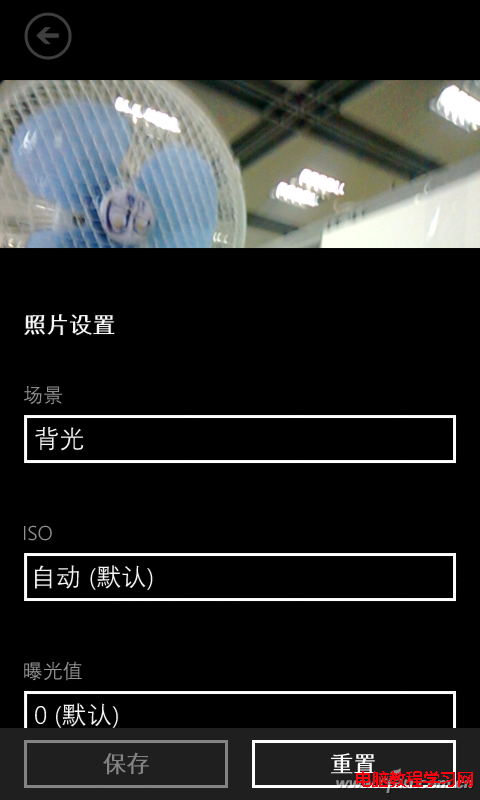
WP8 (Lumia 系列) 內建相機缺少 HDR 模式,但可透過「場景模式 → 逆光」改善背光場景過曝/欠曝,獲得接近 HDR 的動態範圍。
原理: 逆光模式會提高曝光補償、調整測光權重、啟用多幀合成 (若支援),類似 HDR 多張曝光合成邏輯。雖非真正 HDR,但對日常拍攝顯著改善動態範圍。WP8.1 後相機 App 更新已加入「動態範圍」選項,功能更完整。
Windows 10 如何登出/註銷?兩種快速方法:開始選單使用者選單、Alt+F4 關機對話框
Win10 預覽版自動更新後卡在開機畫面?硬碟辨識失效,建議重裝系統
Win10 專業版完美激活兩大教程:KMSpico 工具與 CMD 指令法
Win10 如何單獨關閉瀏覽器音量?音量合成器與 IE 設定兩法
Win7/8.1 同步免費升級 Win10 正式版渠道匯總:系統更新、騰訊管家、鏡像全新安裝、OEM 預裝機
修復 Windows 7 右鍵「電腦」→「管理」無法開啟的問題
Windows XP 內建 VPN 連線設定圖文教學:新增連線精靈完整步驟
Windows 7 無法在同一視窗開啟多個資料夾解決方案:資料夾選項設定與登錄修復雙管齊下