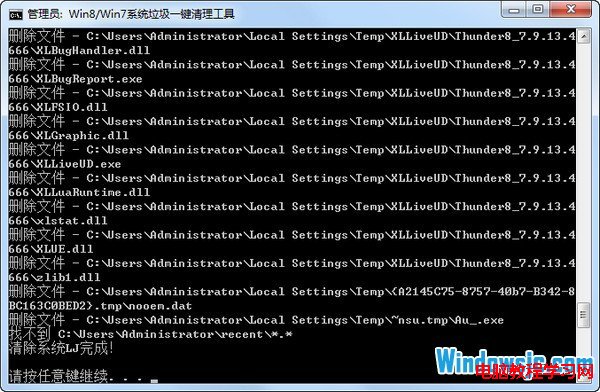
Windows 8.1 同樣繼承 `cleanmgr` 與批次檔清理機制。透過簡單的 `.bat` 腳本,可一鍵清除暫存檔、Prefetch、瀏覽器快取、回收站等系統垃圾,無需安裝任何第三方優化軟體,速度極快。
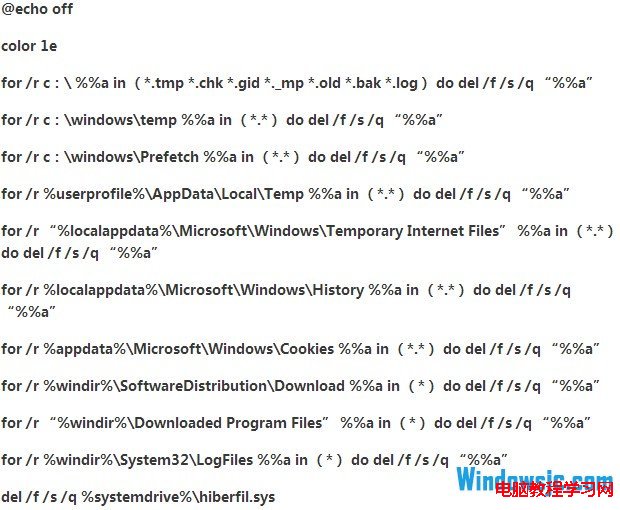
@echo off
echo 正在清理系統垃圾檔案,請稍候...
del /f /s /q %systemdrive%\*.tmp
del /f /s /q %systemdrive%\*._mp
del /f /s /q %systemdrive%\*.log
del /f /s /q %systemdrive%\*.gid
del /f /s /q %systemdrive%\*.chk
del /f /s /q %systemdrive%\*.old
del /f /s /q %systemdrive%\recycled\*.*
del /f /s /q %windir%\*.bak
del /f /s /q %windir%\prefetch\*.*
rd /s /q %windir%\temp & md %windir%\temp
del /f /q %userprofile%\AppData\Local\Temp\*.*
del /f /s /q "%userprofile%\AppData\Local\Microsoft\Windows\INetCache\*.*"
del /f /q %userprofile%\AppData\Local\Microsoft\Windows\History\*.*
echo 清理完成!按任意鍵結束...
pause
| 指令 | 清理目標 | 說明 |
|---|---|---|
| del *.tmp / *._mp / *.log / *.gid / *.chk / *.old | 系統磁碟根目錄下常見暫存副檔名 | /f 強制 /s 遞迴 /q 安靜模式 |
| recycled\*.* | 回收站資料夾 (FAT32/舊版) | NTFS 為 `$Recycle.Bin`,此行相容用 |
| %windir%\*.bak | Windows 目錄備份檔 | |
| %windir%\prefetch\*.* | 預先擷取快取 | 重開機後自動重建,無副作用 |
| rd %windir%\temp & md %windir%\temp | 系統暫存資料夾整個重建 | 最徹底清理,避免權限殘留 |
| %userprofile%\AppData\Local\Temp | 目前使用者暫存資料夾 | Win8/10/11 標準路徑 |
| INetCache / History | IE/Edge Legacy 快取與歷史 | 現代瀏覽器另清 |
Windows Registry Editor Version 5.00
[HKEY_CLASSES_ROOT\Directory\Background\shell\CleanJunk]
@="一鍵清理系統垃圾"
"Icon"="cleanmgr.exe"
[HKEY_CLASSES_ROOT\Directory\Background\shell\CleanJunk\command]
@="cmd /c \"C:\\Path\\CleanJunk.bat\""
桌面空白處右鍵即可直接呼叫,無需尋找批次檔圖示。