Windows XP Windows 7 Windows 2003 Windows Vista Windows 綜合教學 Linux 系統教學
Windows 10 Windows 8 Windows 2008 Windows NT Windows Server 電腦軟體教學
您现在的位置: Windows教程網 >> Windows教程 >  >> Windows 綜合教學 >> 關於 Windows

Win10 專業版/家用版啟用 Windows To Go 功能:從企業版提取檔案註冊登錄一鍵開啟

編輯:關於 Windows

Windows To Go (WTG) 僅內建於企業版/教育版,但可從企業版提取核心檔案複製到專業版/家用版系統目錄並匯入登錄,即可啟用完整 WTG 功能,將 Windows 安裝至 USB 隨身碟/外接硬碟打造隨身系統。

操作步驟 (需系統管理員權限)

  1. 下載「Win10 Windows To Go 功能提取包」 (含 x32/x64 兩版) → 解壓縮。
  2. 64 位系統:
    將 x64\System32 內所有檔案複製到 C:\Windows\System32 (覆蓋/跳過)。
    將 x64\SysWOW64 內所有檔案複製到 C:\Windows\SysWOW64。
    雙擊 pwcreator_x64.reg 匯入登錄。
  3. 32 位系統:
    將 x32\System32 內所有檔案複製到 C:\Windows\System32。
    雙擊 pwcreator_x32.reg 匯入登錄。
  4. 重新開機電腦。

驗證啟用

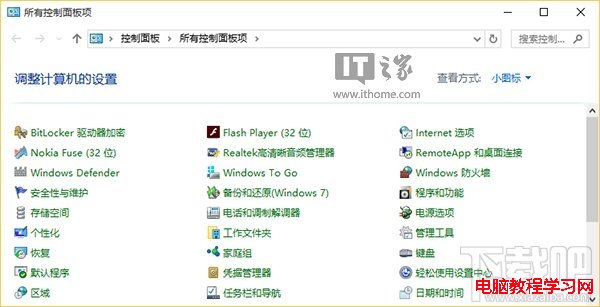
  1. 開啟傳統控制台 (小圖示檢視) → 應可見「Windows To Go」圖示。
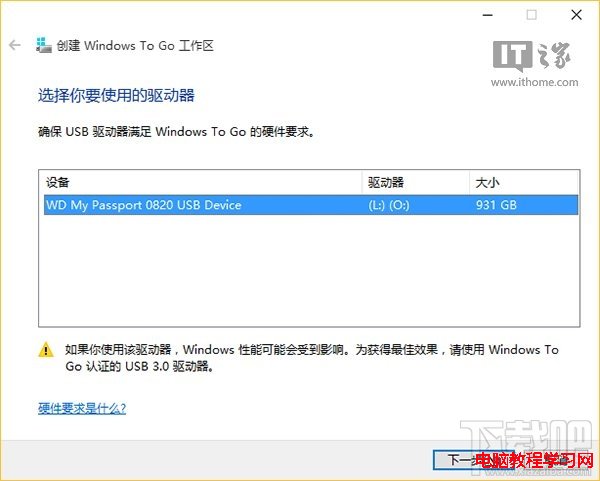
  2. 點開插入 USB 裝置 (建議 USB 3.0 認證裝置) → 依嚮導建立 Windows To Go 工作區。

提取包結構

控制台 Windows To Go

建立工作區嚮導

注意: 修改系統檔案有風險,操作前建議建立還原點;若系統更新覆蓋相關檔案可能導致 WTG 消失,需重複操作。

Copyright © Windows教程網 All Rights Reserved