Cocos2d-x 3.7 已支援 Windows 10 通用應用平台 (UAP)。本文記錄在 Win10 RTM 上安裝 VS2015 Community、勾選 Windows 10 SDK、建立專案、修正 SDK 版本不符導致的編譯錯誤(Retarget 專案至最新 SDK、替換 Windows Phone 參考為 UWP 延伸模組)的完整流程。
環境需求
- Windows 10 RTM 正式版
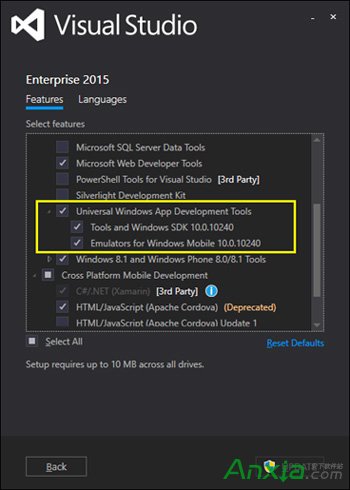
- Visual Studio 2015 Community(官網免費下載)務必勾選 Windows 10 SDK
- Cocos2d-x 3.7.1 原始碼
建立專案與修正編譯錯誤
- 解壓 Cocos 原始碼,使用
cocos new 指令建立專案,會產生 proj.win10 資料夾。
- 用 VS2015 開啟
proj.win10 下的方案檔,直接建置會報錯:The Windows SDK version (10.0.0.0) was not found。
- 修正步驟:
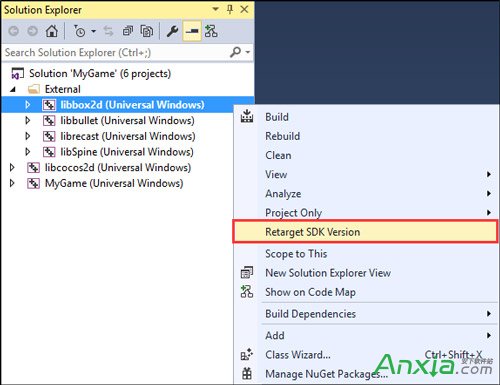
- 方案總管右鍵方案 →「重定目標方案」→ 選擇最新安裝的 SDK 版本(如 10.0.10586.0),所有專案(libbox2d、libbullet、librecast、libSpine、libCocos2d、遊戲專案)全部重定目標。
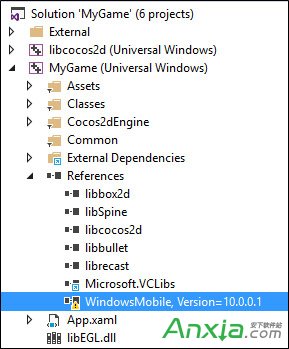
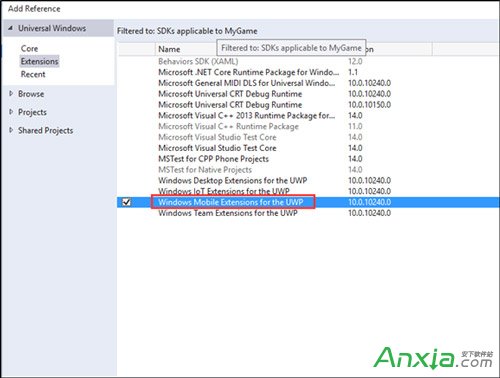
- 遊戲專案的參考中,將「Windows Phone」移除,改加入「Windows Phone Extension for UWP」。
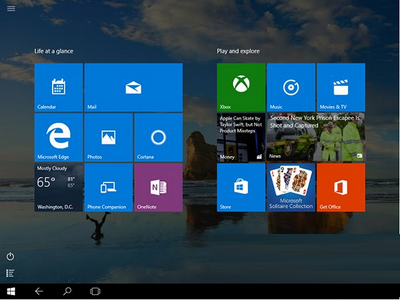
- 重新建置,即可在 Win10 上執行 Cocos 遊戲。