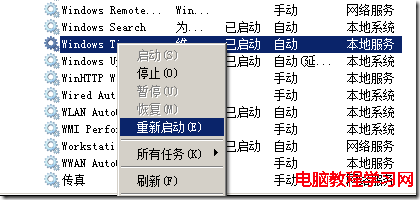
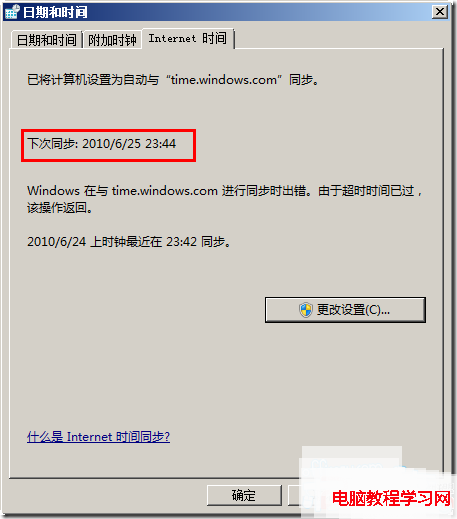
Win7 預設每 7 天(604800 秒)同步一次網路時間,對精度要求高的用戶可改為每天(86400 秒)同步。
regedit 定位:HKEY_LOCAL_MACHINE\SYSTEM\CurrentControlSet\Services\W32Time\TimeProviders\NtpClient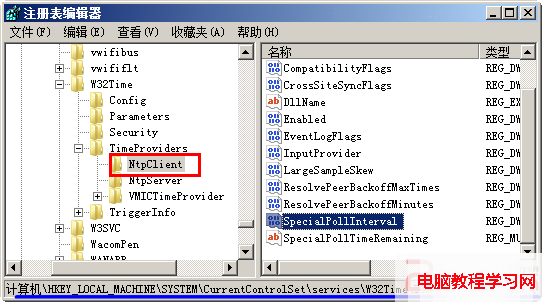
604800 改為 86400。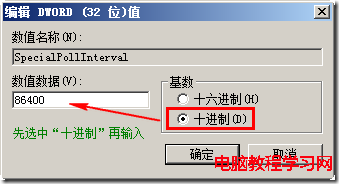
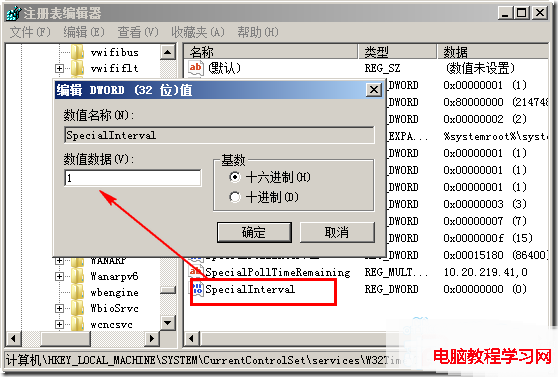
1。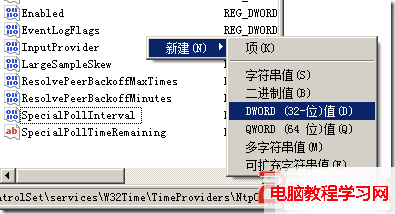
Windows 8.1 IE 瀏覽器無法開啟 (僅管理員身分可開)?登錄檔 Main 權限繼承修復
Win7 遠端桌面連線設定圖解:啟用遠端、防火牆例外一步到位
Win10 開機黑屏只有滑鼠游標?任務管理器重啟 explorer.exe + 註冊表修正 Shell 值雙重保險
Win10 UWP 版 Skype 預覽更新 11.8.202.0:效能提升與 Lumia 950/950 XL/550/650 優化
下載 ISO 映像檔如何安裝 Windows 10?掛載 ISO 直接升級與製作 USB 開機隨身碟完整教學
Win8 開啟隱藏功能:原生 PDF 閱讀器、Ribbon 檔案總管、攝影機應用
WinXP 群組原則阻止程式執行彈出「限制操作」提示?關閉「使用者群組原則重新整理間隔」或「關閉自動更新 ADM」徹底消除彈窗