Windows XP Windows 7 Windows 2003 Windows Vista Windows 綜合教學 Linux 系統教學
Windows 10 Windows 8 Windows 2008 Windows NT Windows Server 電腦軟體教學
您现在的位置: Windows教程網 >> Windows教程 >  >> Windows 綜合教學 >> 關於 Windows

Win7 還原預設字體一鍵完成:控制台字體設定點擊「還原預設字體設定」

編輯:關於 Windows

嘗試更換系統字體後想還原?Win7 內建一鍵還原功能,無需逐個刪除安裝的字體。

還原路徑

  • 中文版:控制台 → 外觀和個人化 → 字體 → 字體設定 → 「還原預設字體設定」。
  • 英文版:Control Panel → Appearance and Personalization → Fonts → Font settings → 「Restore default Font settings」。
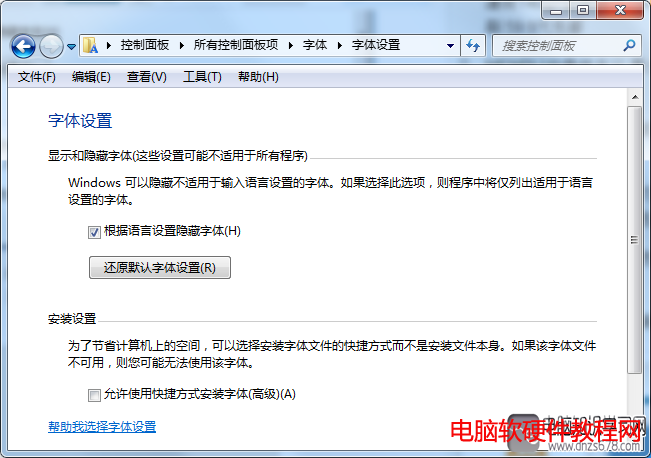
點擊即刻恢復系統預設字體關聯 (微軟正黑體/新細明體等),使用者安裝的額外字體檔案保留於 Fonts 資料夾但不再被系統作為預設使用。


Copyright © Windows教程網 All Rights Reserved