Windows XP Windows 7 Windows 2003 Windows Vista Windows 綜合教學 Linux 系統教學
Windows 10 Windows 8 Windows 2008 Windows NT Windows Server 電腦軟體教學
您现在的位置: Windows教程網 >> Windows教程 >  >> Windows 綜合教學 >> 關於 Windows

Win7 系統檔案修復神技:sfc /scannow 掃描修復損毀系統檔,免重灌

編輯:關於 Windows

Win7 系統出現怪異錯誤、檔案遺失、功能異常,不用急著重灌。內建 系統檔案檢查器 (SFC) 掃描並自動修復損毀/遺失的系統檔案,多數問題可迎刃而解。

操作步驟

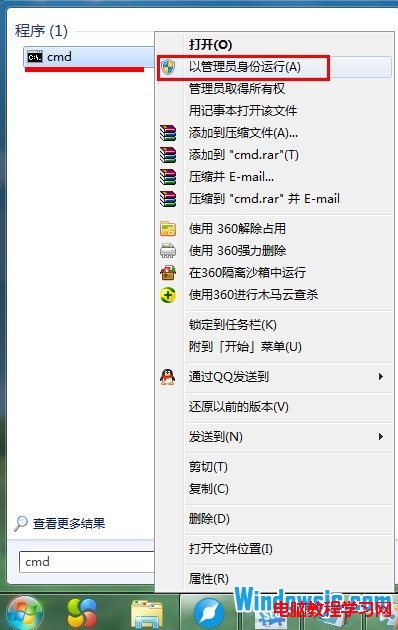
  1. 開始選單搜尋 cmd,右鍵「以系統管理員身分執行」。
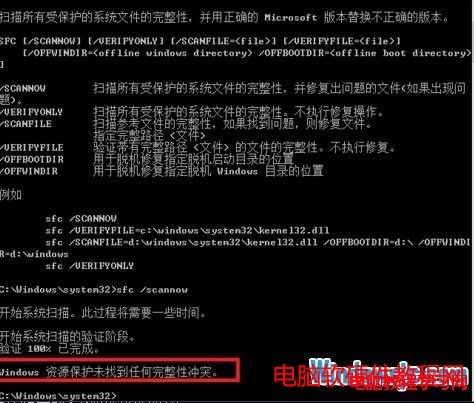
  2. 輸入 sfc /scannow 按 Enter,開始掃描(約 5-15 分鐘)。
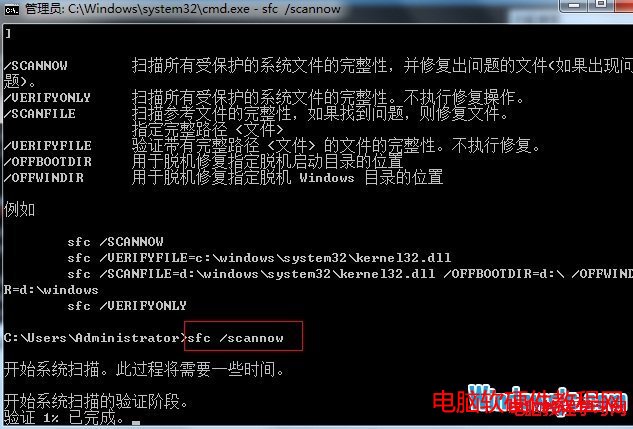
  3. 掃描完成顯示結果:
    「Windows 資源保護未發現任何完整性違規」→ 系統檔完好。
    「找到損毀檔案並成功修復」→ 已自動修復,重開機生效。
    「找到損毀檔案但無法修復」→ 需查看 CBS.log 詳情,或嘗試 DISM 修復、安裝媒體修復。

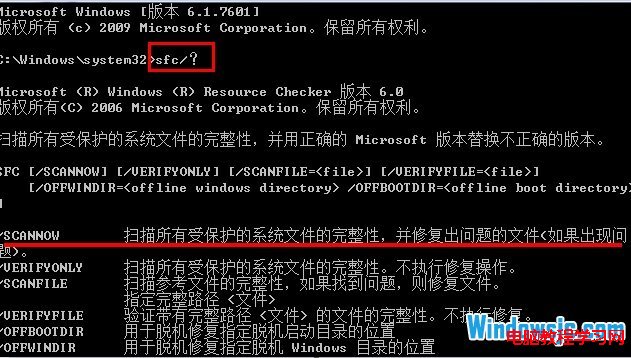
進階指令: sfc /verifyonly 僅掃描不修復;sfc /scanfile=<路徑> 掃描指定檔案;sfc /offbootdir=<路徑> /offwindir=<路徑> 離線修復(WinPE 環境修復無法開機的系統)。

Copyright © Windows教程網 All Rights Reserved