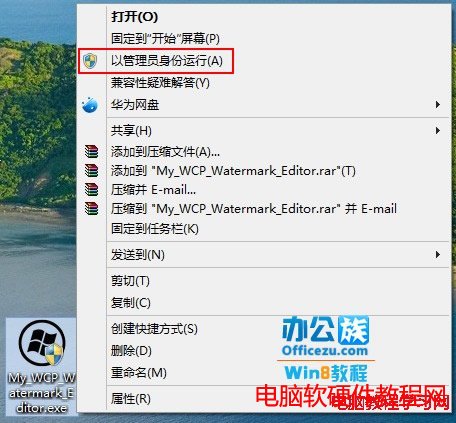
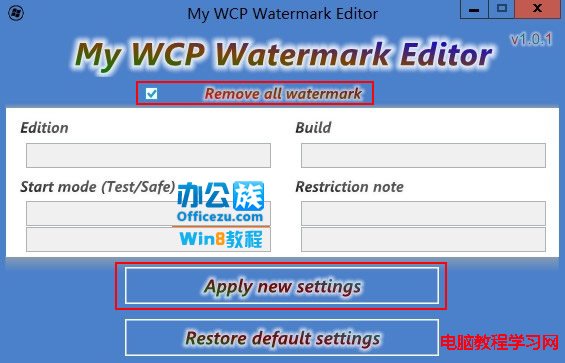
Windows 8 Release Preview 版桌面右下角會顯示版本資訊浮水印,更換桌布也無法移除。使用小工具 My WCP Watermark Editor 可一鍵移除。
注意:此工具僅適用於 Windows 8 RP/CP 測試版,正式版不會有浮水印。修改系統檔案有風險,建議先建立還原點。
Win10 手機版預覽版下載地址:官方連結與更新時間總整理
微軟官方發布 Win10 藍屏死機 (BSOD) 完整修復指南 與預防建議
Win7/Win8.1 免費升級 Win10 官方通道關閉後的兩大替代法:輔助技術通道與「時光倒流」修改系統時間
Win8 升級 Win8.1 後播放器綠畫面?顯卡設定「預設配置」修復
Win7 虛擬記憶體最佳設定:移至非系統盤、固定大小 = 實體記憶體 1.5~2 倍
Win10 全新瀏覽器 Microsoft Edge 圖標首曝光:藍色「e」字造型承襲 IE 又創新
Win8 藍畫面錯誤代碼 0x00000019 完整排除指南:BAD_POOL_HEADER 核心記憶體池損毀
Windows 10 升級 10240 卡在「等待下載」解決方案:重啟更新服務與 BITS