Win 8 C 槽右鍵重新命名無反應,可透過登錄檔 DriveIcons 強制指定磁碟標籤名稱,解決介面操作失效問題。
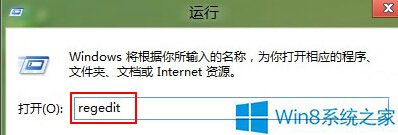
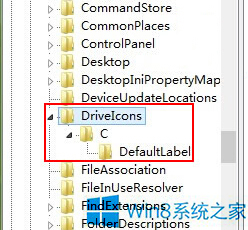
regedit。HKEY_LOCAL_MACHINE\SOFTWARE\Microsoft\Windows\CurrentVersion\Explorer\DriveIcons\C\DefaultLabel(無則逐層新增「項」)。DefaultLabel 預設值雙擊 → 數值資料輸入想要的標籤名稱(如 Windows8)→ 確定。同法適用 D/E/F 等其他磁碟,只需將路徑中 C 替換為對應磁碟代號。
微軟停止預裝 Win7 家用/旗艦版:為 Win9 鋪路,逼退 Win7 龐大存量用戶
Windows 10 Build 9879 新功能曝光 (一) : IE11 工具列新增笑臉回饋按鈕,指向 modern.ie 官網回報相容性問題
WinXP 系統時間無法同步、時區不顯示?三大主因與完整修復指南
微軟宣布 Windows 10 Creators Update 2017 年初登場:3D、遊戲、溝通三大重點,免費升級
Win10 Caps Lock 大小寫切換失靈?鍵盤進階設定一鍵修正
Win10 更新下載卡在 0% 解決方案:重啟 Wuauserv 服務