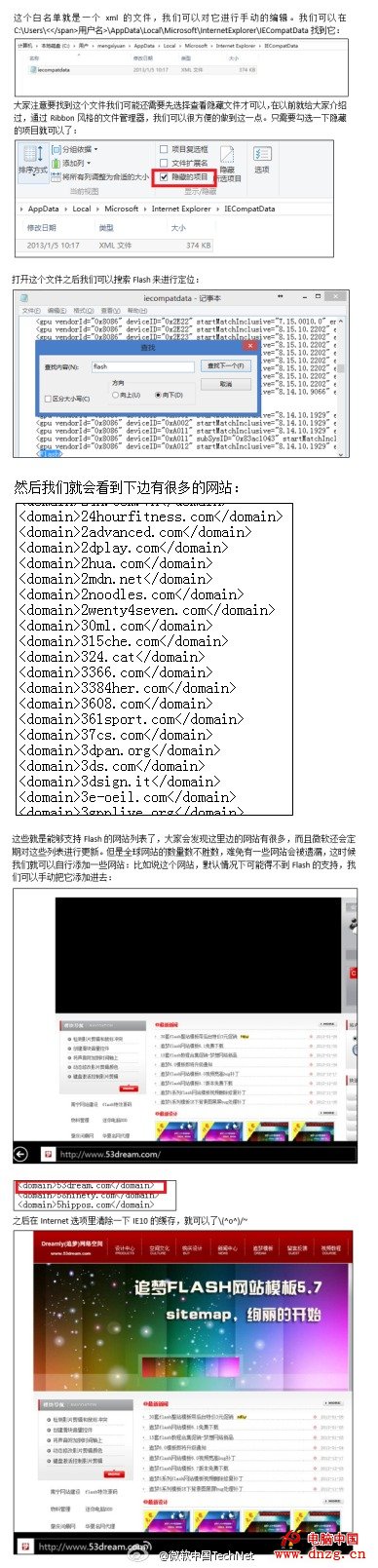
微軟啟用 IE10 Flash 白名單機制(相容性檢視列表),預設擋掉體驗差的網站。若常用網站不在名單,可手動添加:
C:\Users\用戶名\AppData\Local\Microsoft\Internet Explorer\IECompatData
Flash
微軟定期更新名單,自行添加可即時支援常用未收錄網站。
Windows 10 原生支援 MKV 影片播放:Windows Media Player 直接開啟無需解碼器
中國用戶關注 Win8 問題匯總解答(下):進入安全模式、開機 F8 失效救援、徹底關機、USB 安裝碟 UEFI 啟動限制
Windows 8 磁碟管理調整分區大小:內建壓縮/擴充卷、第三方分區助手無損調整更靈活
Win8.1 驅動程式架構大改良:用戶模式運行、免重開機、支援更多裝置
開始按鈕有望回歸?Windows 8.1 或將妥協用戶呼聲
Win8.1 應用商店升級 開發者可提交相容 8.1 版應用
Windows 8 電源選單添加「休眠」選項:關機設定解鎖一鍵啟用
Windows 8 安裝至行動硬碟 (Windows To Go) 完整圖文教學