許多 Win8 使用者習慣用 QQ 或第三方工具截圖,其實系統內建 Win + PrtSc 組合鍵即可一鍵全螢幕截圖並自動儲存,無需額外軟體。
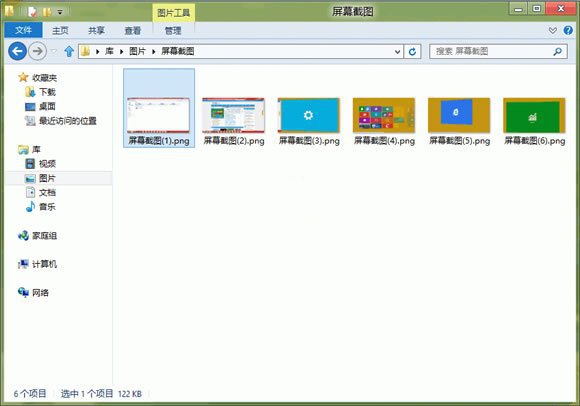
同時按下 Win + PrtSc(Print Screen),螢幕會瞬間閃爍一次,截圖自動儲存為 PNG 格式於:
圖片庫 → 螢幕截圖 資料夾中。
檔名預設為「螢幕截圖 (編號).png」,方便後續整理。若需僅複製到剪貼簿,可使用傳統 PrtSc 或 Alt+PrtSc(作用中視窗)。
Win 8 無法上網真兇:快速啟動導致網卡驅動誤識別,關閉快啟 + 重裝驅動根治
找回 Win8「中文-美式鍵盤」:讓 Ctrl+Shift 切換輸入法重現江湖
Windows 8 雙介面 IE10 瀏覽器深度解析:桌面版傳承經典、Modern 版沉浸觸控、共享安全隱私基因
提速電腦:Win8 可安全設為手動啟動的系統服務清單與操作指南
Win8 計算機在哪裡?兩種快速找到內建計算機的方法
Windows 8 Beta 版應用商店將開業:首階段所有應用免費,微軟測試商店機制與收集開發者回饋
Windows 8 系統安裝全攻略:從備份到軟體推薦的完整指南
Windows 8.1 Update 細節深度解析:易被忽略的關鍵變更