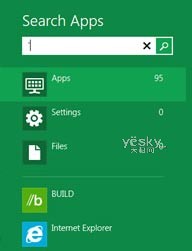
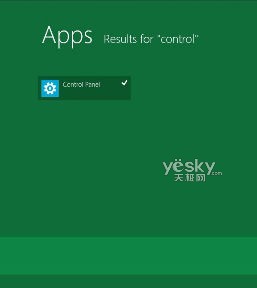
誤刪開始畫面的「控制台」磚塊時,可透過開始畫面搜尋功能快速找回並重新固定。
Control
搜尋 + 固定,誤刪磚塊秒找回!
Windows Vista 隱藏功能啟用:簡體中文手寫輸入、媒體中心、透明 3D 視窗效果
Windows 8.1 查看 CPU、顯示卡、記憶體規格完整教學:裝置管理員、系統資訊、魯大師
Win8 正確連接與安全移除 USB 裝置 避免資料損毀
Windows 8 64 位元安裝 Office 2010 32 位元錯誤 2705 解決:安裝 KB2680376 更新修復字型衝突
Windows 8 加速關機:群組原則調整等待逾時時間
Ghost 安裝系統出現 error 5555h?通用 PE 工具箱修復 MBR 引導
徹底解決 Windows 8 筆電音訊爆音、破音、卡頓問題
升級 Win8.1 後出現「你的 Windows 8.1 安裝無法完成」?wsreset 清除商店快取解決