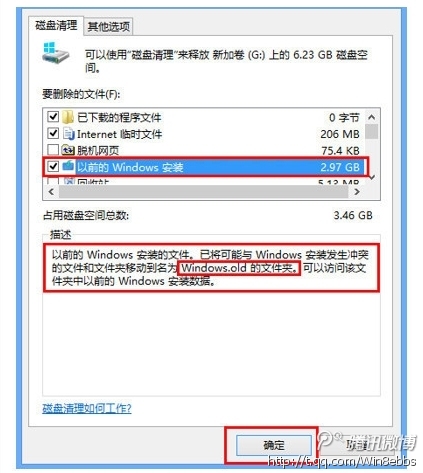
許多使用者在從舊版 Windows 升級到 Windows 8 後,會發現 C 槽硬碟空間大幅縮水。罪魁禍首通常是 Windows.old 資料夾,它保留了完整的舊版系統檔案,佔用數 GB 空間。若您確定不需要回滾系統,可透過內建「磁碟清理」工具安全移除。
Windows.old
完成後,C 槽將釋放大量空間。建議清理前確認無需還原舊系統,因刪除後無法復原。
Win8 系統優化:透過工作管理器與第三方工具禁用開機啟動項,大幅提升開機速度
Win8 桌面背景突然變黑?刪除註冊表 LogPixels 值恢復
Windows 8 清除文件资源管理器“常用位置”历史记录的方法
Win8 IE10「移至複製的位址」功能:一鍵開啟剪貼簿網址
Win8 硬碟分區內建工具教學:磁碟管理壓縮卷建立新分區
Windows 8 開啟檔案總管的 3 種最快方法
Windows 8 開機直接進入傳統桌面設定教學
Windows 8 十大優缺點深度評測:內建廣告、應用商店內購、RT 混淆、強大搜尋、桌面/Metro 不兼容、檔案傳輸暫停、任務管理器增強、截圖自動存檔、空白介面與缺乏右鍵