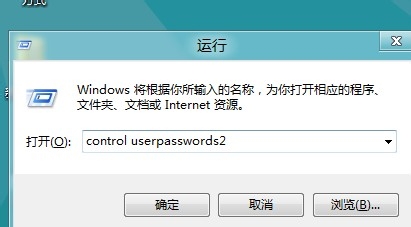
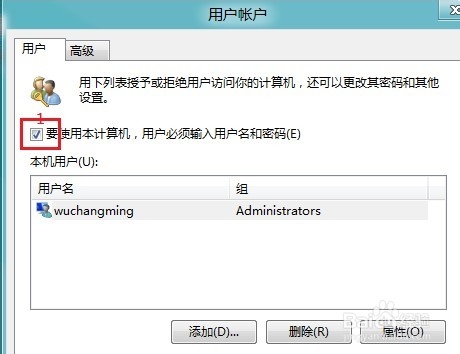
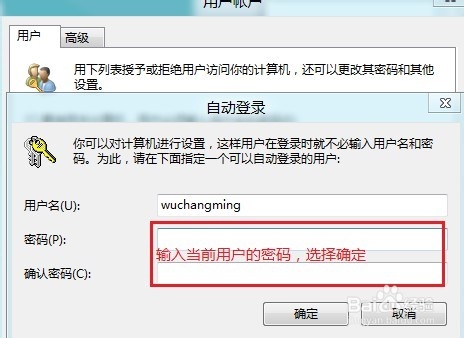
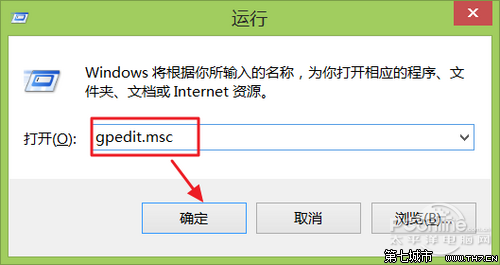
除 netplwiz 外,另一指令 control userpasswords2 亦可設定自動登入:
netplwiz
control userpasswords2
同樣達成免密碼自動登入,指令不同但效果相同。
Win8 安裝《英雄聯盟》失敗?檢查安裝檔完整性與磁碟空間
Windows 8 IE10 不記住帳號密碼?完整排查與修復指南(含群組原則方案)
英文版 Win8 正常顯示中文檔案:控制台地區設定變更系統地區為中文
Windows 8 取消開機登入密碼:netplwiz 設定自動登入
Win8.1 WLAN 顯示「無法使用」?疑難排解與驅動重裝指南
Win8 雙顯卡切換完整教學:AMD/NVIDIA 獨顯與核顯三種切換模式圖解
Win8.1 開啟工作管理器三大法
Win8.1 開機網路圖示黃色驚嘆號卡頓?試試這三招