Outlook 2013 使用 Exchange 快取模式時,.ost 檔預設存放於 C 槽,隨時間增大佔用系統盤空間。Outlook 介面無法直接修改路徑,需透過 Office 自訂工具 (OCT) 結合群組原則變更:
admintemplates_64bit.exe 解壓至暫存資料夾(如 temp)。outlk15.admx 與 zh-cn 資料夾複製至 C:\Windows\PolicyDefinitions(系統盤非 C 槽請自行調整)。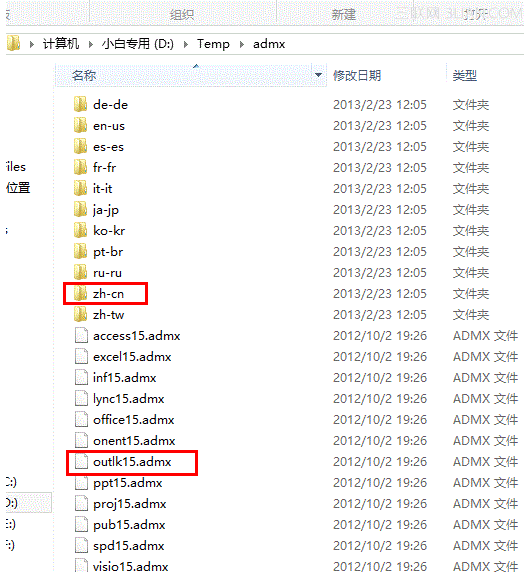
gpedit.msc 開啟群組原則編輯器,依路徑導航至 Outlook 2013 設定,修改 .ost 檔預設路徑為目標資料夾(如 D:\OutlookData)。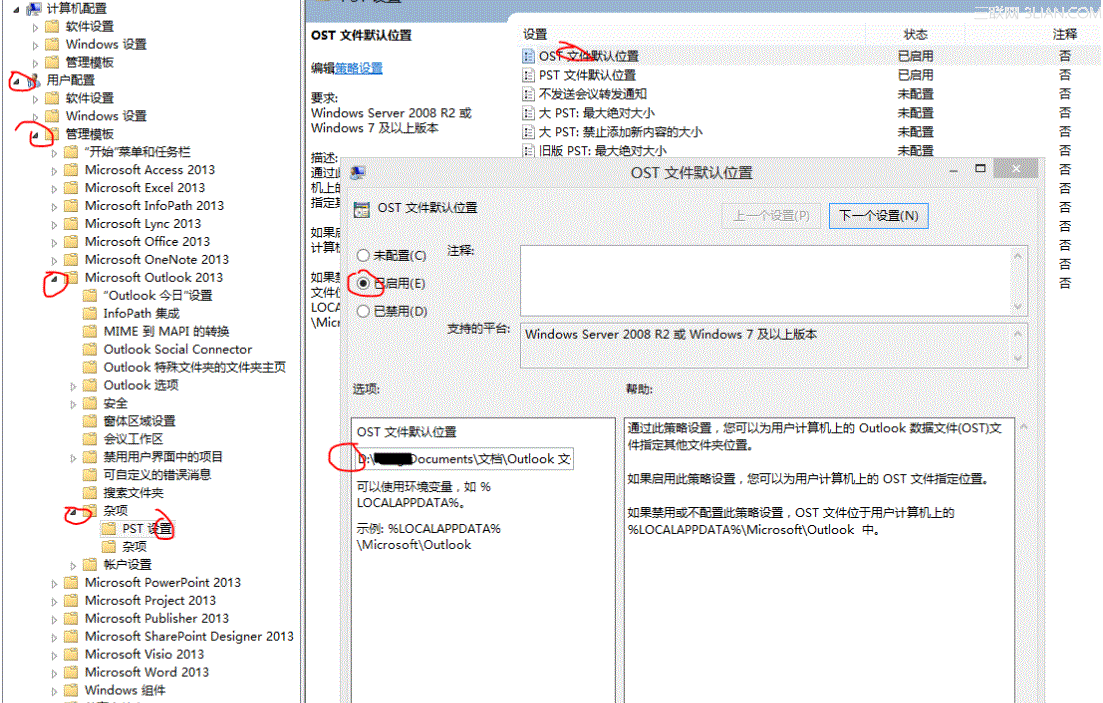
此法從部署層面解決 .ost 路徑固定問題,適合企業環境統一管理。
Windows 8.1 預覽版無法卸載?官方解決方案與替代方案全解析
Win8/8.1 休眠選項消失找回:群組原則啟用顯示休眠 + powercfg 解決裝置喚醒衝突
Win8.1 WLAN 顯示「無法使用」?疑難排解與驅動重裝指南
Windows 8.1 Xbox Music 更新:界面精修、專輯封面突顯、貼靠模式優化
靜態 IP 與 MAC 位址綁定 (ARP -s) 實作教學:防止 IP 盜用
Windows 8.1 正式版十大新特性體驗:開始按鈕、Metro 個人化、Bing 搜尋、IE11、Store、SkyDrive、Xbox Music、多任務、DirectX 11.2、3D 列印