Metro 應用程式要求最低解析度 1024×768,許多 9-10 吋筆電或舊螢幕無法達標,會彈出「解析度過低」錯誤。可透過修改登錄檔突破限制。
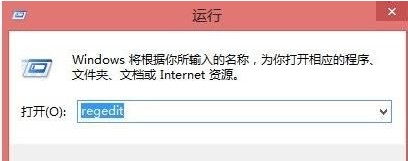
regedit
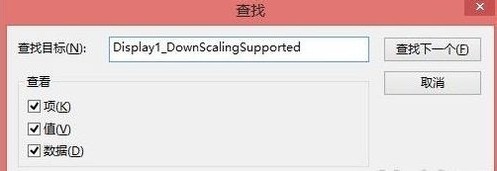
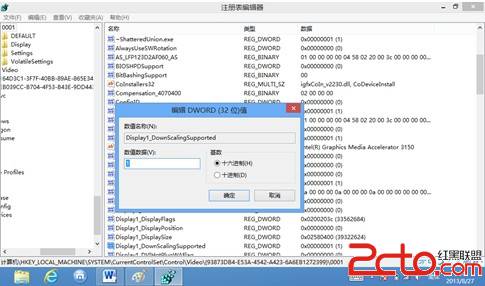
Display1_DownScalingSupported
0
1
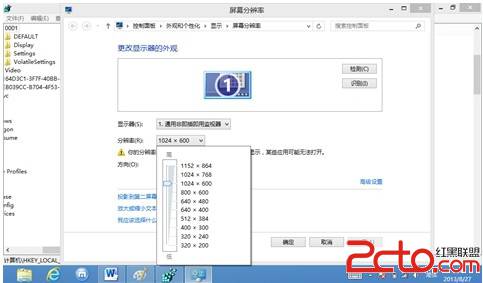
重開機後解析度選項可調整至 1024×768 或 1152×864(建議),即可正常執行 Metro 應用程式。
原理:啟用顯示卡縮放支援,讓系統接受低於原生面板解析度的輸出模式。
Win8.1 右鍵開始按鈕找不到命令提示字元?任務列屬性還原
Win8 系統寬頻撥號自動連線設定圖解:記住密碼與撥號設定
Win8 系统文件损坏/丢失?sfc /scannow 修复失败再用 DISM 联网还原映像
Win8 設定滑鼠指標樣式:Win+I → 控制台 → 輕鬆存取 → 輕鬆存取中心 → 變更滑鼠運作方式
Windows 8 資料夾選項與程式庫進階應用:打造高效檔案管理動線
Win8 右鍵選單「新增」消失了?登錄檔修復 ContextMenuHandlers\New 預設值
Win8 + Win7 雙系統啟動技巧:設 Win7 為預設進入傳統啟動選單,免除進入 Win7 前強制重開機
Windows 8 如何將開始畫面應用程式釘選至工作列