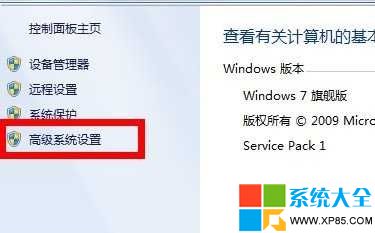
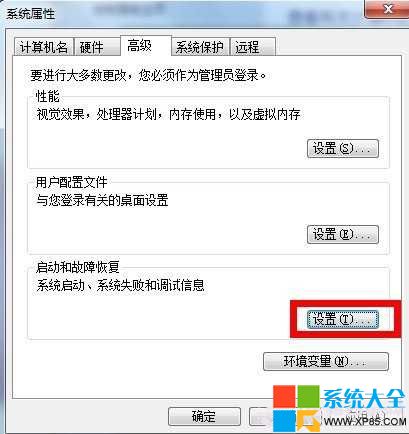
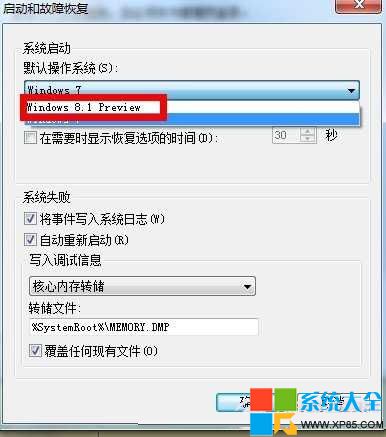
安裝 Win8.1 與舊版 Windows 雙系統後,預設開機項目可能不是 Win8.1。透過系統屬性中的「啟動與故障復原」設定,可輕鬆將 Win8.1 指定為預設作業系統。
重開機後即會直接啟動 Win8.1,無需在開機選單等待倒數。
Win8 攝像頭無法使用?驅動精靈「攝像頭修復」功能 10 秒自動修好
Win8 設定遠端桌面固定連接埠:登錄修改四處 PortNumber 並更新防火牆規則
Windows 8.1 Update 自訂關機選單:登錄編輯移除/新增睡眠、休眠、鎖定等選項
Win8 啟用 Hyper-V 虛擬化平台完整教學
Win8 英文輸入法不見了?Ctrl+Shift 切換與語言列設定找回
Win8 恢復系統預設色彩設定:色彩管理進階修復顯示異常/色彩錯誤
Win8 平板重裝/還原系統完整指南:刷新電腦保留檔案 vs 重設電腦清除一切
Win8 桌面捷徑小箭頭移除與恢復:批次檔一鍵操作