Windows 8 提供靈活的檔案關聯設定,可針對單次開啟或永久變更預設程式。
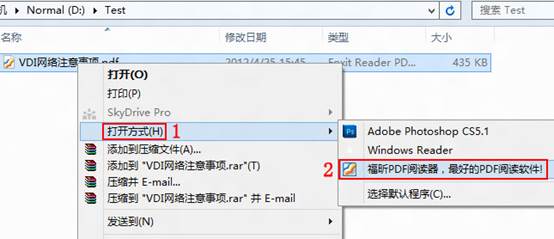
單次使用指定程式開啟
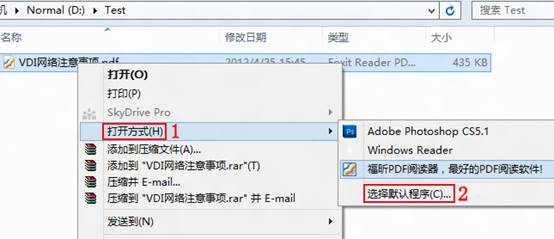
- 檔案上右鍵 → 「開啟方式(H)」 → 從清單選擇所需程式。
永久變更預設程式
- 右鍵選單選擇「選擇預設程式(C)...」。
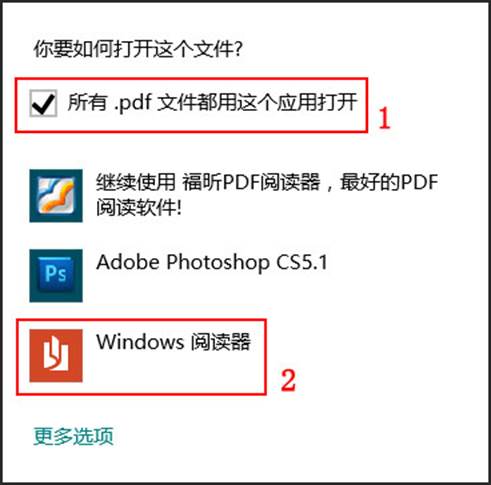
- 對話框中務必勾選「所有 .pdf 檔案都用這個應用程式開啟」,再點選列表中的程式(如「Windows 閱讀器」)。
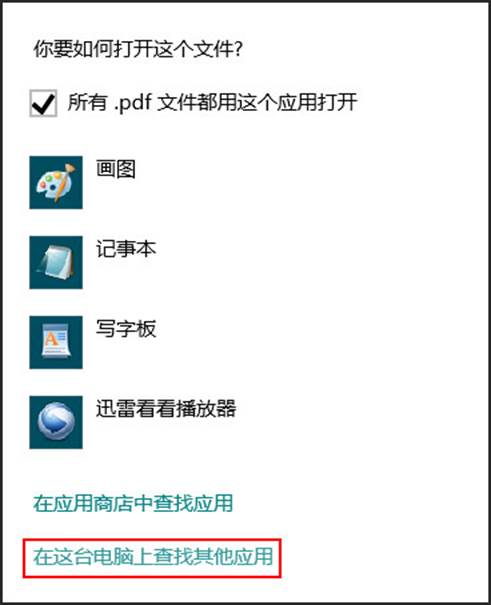
- 若清單無所需程式,點選「更多選項」→「在這台電腦上尋找其他應用程式」,手動瀏覽選擇 .exe 執行檔。
此設定即時生效,同副檔名所有檔案將使用新指定程式開啟。也可透過「控制台」→「預設程式」→「設定預設程式」進行批量管理。