Windows XP Windows 7 Windows 2003 Windows Vista Windows 綜合教學 Linux 系統教學
Windows 10 Windows 8 Windows 2008 Windows NT Windows Server 電腦軟體教學

Windows 8 卸載桌面小工具:右鍵選單移除不需要的 Gadget

編輯:Win8 系統應用技巧

Windows 8 移除桌面小工具:Gadget 介面右鍵卸載

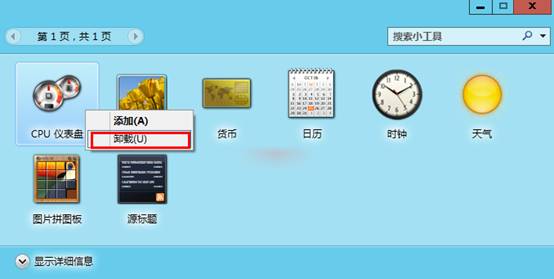
Windows 8 桌面小工具 (Gadget) 若不再需要,可直接在小工具介面移除。操作如下:
操作步驟

  1. 在桌面小工具介面 (或啟動小工具庫) 找到欲移除的小工具。
  2. 對該小工具按右鍵 → 選擇「卸載」。
  3. 小工具右鍵卸載
  4. 確認對話框點選「是」,小工具即從桌面與庫中移除。
補充說明:
  • Windows 8/8.1 仍支援桌面小工具,但 Microsoft 已停止官方 Gadget 圖庫服務並建議改用 Modern 應用。
  • 第三方小工具卸載後,相關檔案通常位於 %LOCALAPPDATA%\Microsoft\Windows Sidebar\Gadgets\ 或 %PROGRAMFILES%\Windows Sidebar\Gadgets\,可手動刪除殘留資料夾。
  • 若要恢復預設小工具,可在控制台 → 「外觀與個人化」 → 「桌面小工具」 → 「恢復 Windows 上安裝的桌面小工具」。

Copyright © Windows教程網 All Rights Reserved