Windows XP Windows 7 Windows 2003 Windows Vista Windows 綜合教學 Linux 系統教學
Windows 10 Windows 8 Windows 2008 Windows NT Windows Server 電腦軟體教學

Windows 8 開啟手寫輸入數學公式:數學輸入面板完整教學

編輯:Win8 系統應用技巧

方法一:從開始畫面啟動

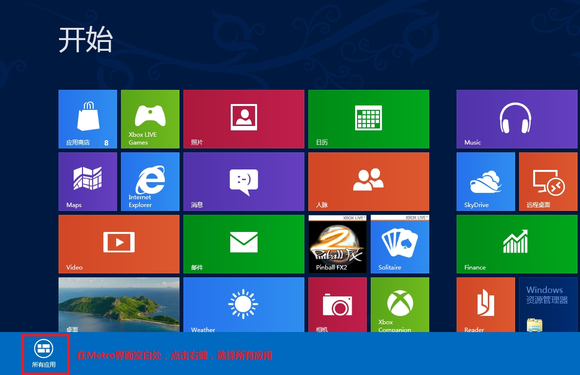
  1. 開始畫面空白處右鍵 → 「所有應用程式」。
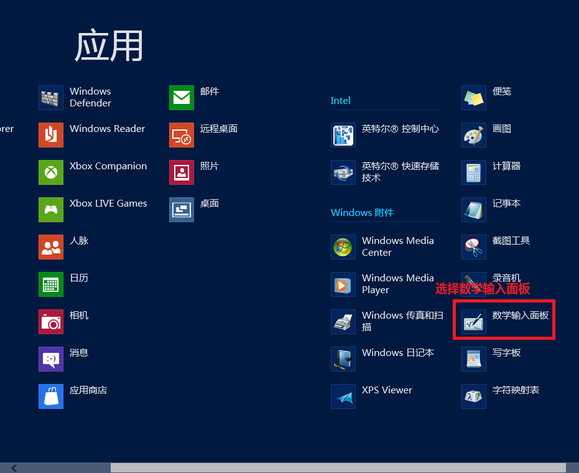
  2. 找到「數學輸入面板」 → 點選啟動。
所有應用程式 數學輸入面板圖示 手寫輸入公式介面

方法二:執行指令快速啟動(傳統桌面)

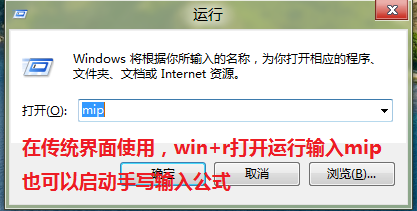
  1. Win+R → 輸入 mip → 「確定」。
執行 mip 指令

功能介紹

  • 支援滑鼠、觸控筆、手指手寫數學公式。
  • 自動辨識並轉換為 MathML 格式。
  • 工具列提供:書寫、選取、刪除、更正(候選字)、撤銷/重做。
  • 「插入」按鈕將公式貼至作用中應用程式(Word、OneNote、WordPad、支援 MathML 的編輯器)。
  • 「歷程記錄」可回溯先前輸入的公式。

適用場景

  • 撰寫數學、物理、化學報告、論文。
  • 教學投影片製作、線上教學白板。
  • 快速記錄複雜公式避免 LaTeX 語法輸入。
Copyright © Windows教程網 All Rights Reserved