Windows XP Windows 7 Windows 2003 Windows Vista Windows 綜合教學 Linux 系統教學
Windows 10 Windows 8 Windows 2008 Windows NT Windows Server 電腦軟體教學

Windows 8 使用「預覽窗格」快速預覽檔案內容不開啟程式

編輯:Win8 系統應用技巧

啟用步驟

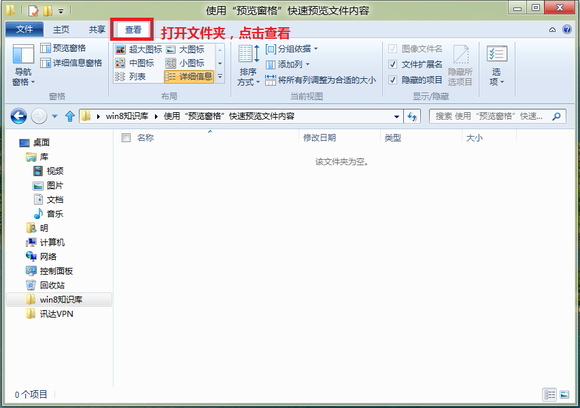
  1. 開啟任意資料夾(檔案總管)。
  2. 點選功能區「檢視」索引標籤。
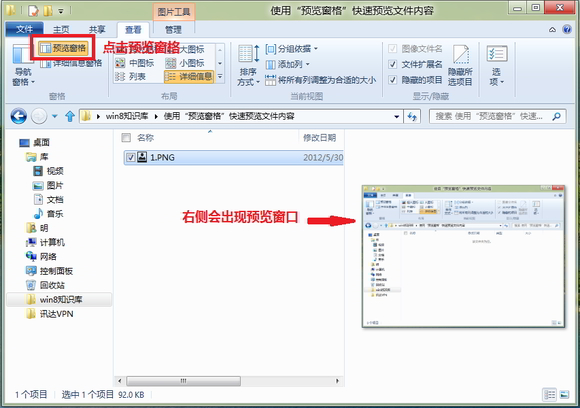
  3. 勾選「預覽窗格」。
檢視索引標籤 預覽窗格效果

支援預覽的檔案類型

  • 圖片:JPG、PNG、BMP、GIF、TIFF 等。
  • 文字:TXT、INI、LOG、CSV、XML、JSON、HTML、CS、PY 等。
  • 文件:PDF(需安裝 PDF 預覽處理常式,如 Adobe Reader、Foxit)、Office 檔案(需安裝 Office 或 Office 預覽處理常式)。
  • 音訊/影片:部分格式支援中繼資料與縮圖預覽。

操作技巧

  • 單擊選取檔案即可在右側預覽,不會啟動關聯程式,適合快速瀏覽大量檔案。
  • 可拖曳預覽窗格邊框調整寬度。
  • 搭配「詳細資料窗格」(同一「檢視」索引標籤)可同時查看檔案屬性(大小、修改日期、標記等)。
Copyright © Windows教程網 All Rights Reserved