Windows XP Windows 7 Windows 2003 Windows Vista Windows 綜合教學 Linux 系統教學
Windows 10 Windows 8 Windows 2008 Windows NT Windows Server 電腦軟體教學

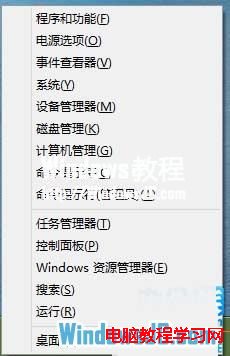
修復 Windows 8 Win+X 快捷鍵失效(開始選單無法開啟)

編輯:Win8 系統應用技巧

使用不相容的 Windows 8 優化軟體後,常導致 Win+X 快捷鍵失效、開始選單無法開啟。原因是登錄表關鍵值 IsShortcut 被誤刪。透過手動重建即可修復。

修復步驟

  1. 按 Win+R 輸入 regedit 開啟登錄編輯器。
  2. 定位至 HKEY_CLASSES_ROOT\lnkfile,右鍵空白處 → 新增 → 字串值 → 命名 IsShortcut(無需數值資料)。
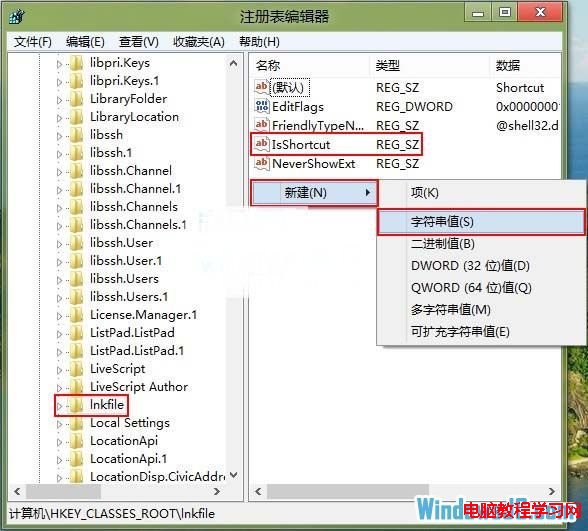
  3. 新增 IsShortcut
  4. 同樣在 HKEY_CLASSES_ROOT\piffile 下新增字串值 IsShortcut。
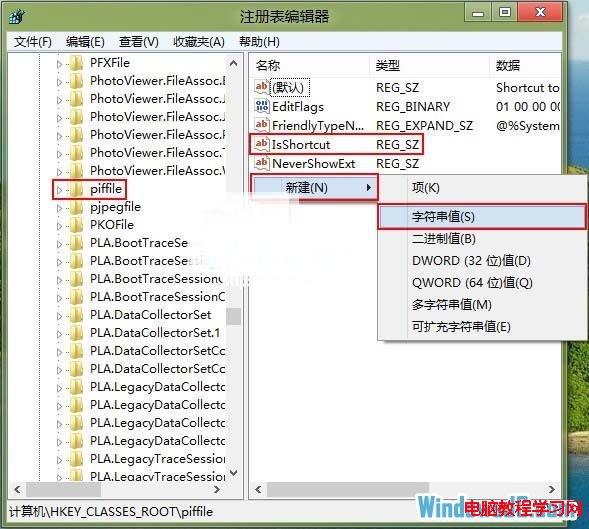
  5. piffile 新增 IsShortcut
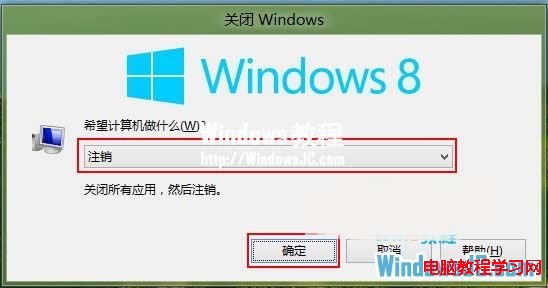
  6. 按 Alt+F4 登出或重新啟動電腦。
  7. 登出
  8. 再次按 Win+X 驗證開始選單是否恢復正常。
  9. 驗證修復

此問題常由號稱「完美支援 Win8」的優化軟體造成,建議避免使用此類工具,改用系統內建維護功能或可信賴的輕量工具。

Copyright © Windows教程網 All Rights Reserved