Windows 8 更新 Flash Player 後,若瀏覽器無法載入 Flash 內容,通常是元件註冊失敗。透過命令提示字元重新註冊 Flash.ocx 即可解決。
cmd 並按 Enter 開啟命令提示字元。cd C:\Windows\System32\Macromed\Flash
regsvr32 Flash.ocx
cd C:\Windows\SysWOW64\Macromed\Flash
regsvr32 Flash.ocx
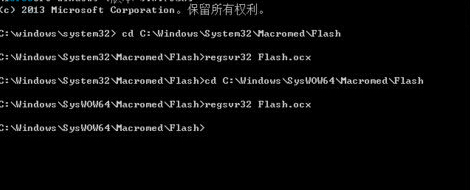
注意: 64 位元系統需同時註冊 System32(32 位元瀏覽器用)與 SysWOW64(64 位元瀏覽器用)兩個路徑下的 Flash.ocx。